





EaglePryde
Members
-
Joined
-
Last visited
-
Ok thanks and i'll try my best :-)
-
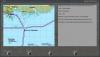
It's not the map itself that is the problem. It's the grid coordinates in the mission description and the given waypoints. It writes "RAF No. 303 Squadron : Protect Moschnyi Harbor (B-8). Moschnyi Harbor is not B8 but rather close to F3 on the Grid. The Waypoints i am given are around B8 but the Location has a different name. So what would be correct for this mission? Stick to the given Waypoints or ignore them and fly down to Moschnyi Harbor that isn't even in my occupation zone what would have to be a bomber mission to or something similar to claim it. It's all a bit confusing.
-
Hi there. I am using the newest DCG beta but this also happend with previous Versions of DCG. This is the start of the Brittain40 Campaign at the very start. It always looks like this in the first round. The Waypoints don't fit to the Mission description. The Grid references also don't fit to the locations on the map. The only thing that seems to be ok and valid is the objectives description. It's an online campaign what i'm trying to Play. I use DGen and NGen replacement mode with everything else left as it is in the DCG Settings. I attached a screenshoot for better understanding
-
-Delete this. Accidental double post-
