KennethBear
Members
-
Joined
-
Last visited
-
Hi, I now get this error whenever I try and start any campaign. [2026/04/30 21:58:02.716] Parameter String0 = D:\IL2\IL 2 Sturmovik 1946\DGen.exe [2026/04/30 21:58:02.716] Parameter String1 = it [2026/04/30 21:58:02.716] Parameter String2 = 0 [2026/04/30 21:58:02.716] DCG.ini processed. [2026/04/30 21:58:02.720] Message File Found for English. [2026/04/30 21:58:02.725] Message File Found for English. [2026/04/30 21:58:02.730] Loaded messages processed. [2026/04/30 21:58:02.732] DCG is active. [2026/04/30 21:58:02.735] Game version checked [1946]. [2026/04/30 21:58:02.737] Game version includes IL2AEP [True]. [2026/04/30 21:58:02.737] Game version successfully set up. [2026/04/30 21:58:02.742] Begin Parameter Check [2026/04/30 21:58:02.746] Setting new log file date. [2026/04/30 21:58:02.748] Game Path = D:\IL2\IL 2 Sturmovik 1946\ [2026/04/30 21:58:02.748] Finding configuration file to determine log file name. [2026/04/30 21:58:02.748] Logfile = eventlog.lst [2026/04/30 21:58:02.750] Reading Campaign Data. [2026/04/30 21:58:03.22] The map is Greco-Italian. [2026/04/30 21:58:03.33] Target Locations processed. [2026/04/30 21:58:03.37] Ship names and classes loaded. [2026/04/30 21:58:03.44] Import of Squadrons Begins. [2026/04/30 21:58:03.53] Squadron Merging Begins. [2026/04/30 21:58:03.54] Import of Squadrons Complete. [2026/04/30 21:58:03.58] Master Mission Imported. [2026/04/30 21:58:03.73] No entry found for Player Squadron in the squadids.dcg file. [2026/04/30 21:58:03.426] No entry found for Player Squadron in the squadids.dcg file. [2026/04/30 21:58:03.426] The replacement plane for the Do_22K ("None") was not found in the Class.DCG file. Would you know how to fix this? I'm using BAT 4.3
-
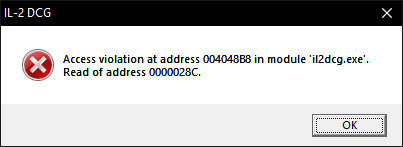
Hi, every time I try and start a campaign on DCG, the game alt tabs and doesn't start the campaign. I am using VP Modpack most recent. This is my most recent Il-2 DCG error, although when it fails to generate a campaign it gives no noticable error message [2026/03/27 15:08:56.332] Parameter String0 = K:\IL2 Versions\IL2DCGVP\il2dcg.exe [2026/03/27 15:08:56.332] DCG.ini processed. [2026/03/27 15:08:56.333] Message File Found for English. [2026/03/27 15:08:56.334] Message File Found for English. [2026/03/27 15:08:56.343] Loaded messages processed. [2026/03/27 15:08:56.351] DCG is active. [2026/03/27 15:08:56.357] Game version checked [1946]. [2026/03/27 15:08:56.364] Game version includes IL2AEP [True]. [2026/03/27 15:08:56.364] Game version successfully set up. [2026/03/27 15:08:56.367] Mission Button Enabled. [2026/03/27 15:08:56.373] Player Name Checked. [2026/03/27 15:17:30.500] DCG is active. [2026/03/27 15:17:30.535] Game Path = K:\IL2 Versions\VP\IL 2 Sturmovik 1946\ [2026/03/27 15:17:30.535] Finding configuration file to determine log file name. [2026/03/27 15:17:30.536] Logfile = eventlog.lst Does anyone know how to fix this? Just to add just tried to launch DCG and got the error