


Nephris
-
Posts
132 -
Joined
-
Last visited
-
Days Won
1
Everything posted by Nephris
-
So back at home ... Am receiving with the new beta build (FBDj implementation & activated) an I/o error 1224 dcg.error [2015.03.19 17:54:38.89] Campaign folder (D:\IL2 Dedicated Server\Missions\FBDj\) selected. [2015.03.19 17:54:38.89] Ship Info processed. [2015.03.19 17:54:38.104] Target Locations processed. [2015.03.19 17:54:38.104] Read Territory information. [2015.03.19 17:54:38.120] Set Target Nation Began. [2015.03.19 17:54:38.136] Set Target Nation Ended. [2015.03.19 17:54:38.136] Checking Stationary List [2015.03.19 17:54:38.792] Stationary Objects Check. [2015.03.19 17:54:40.214] Squadron base routine started. [2015.03.19 17:54:40.229] II_SchG20 was removed from an enemy airfield. [2015.03.19 17:54:40.229] II_SchG20 was assigned to Simferopol_Sud_Airfield. [2015.03.19 17:54:40.229] III_StG20 was removed from an enemy airfield. [2015.03.19 17:54:40.245] III_StG20 was assigned to Simferopol_Sud_Airfield. [2015.03.19 17:54:40.245] g011 was removed from an enemy airfield. [2015.03.19 17:54:40.245] g011 was assigned to Sevastopol_Ost_Airfield. [2015.03.19 17:54:40.276] Squadron base routine ended. [2015.03.19 17:54:40.276] Check for Duplicate Squadrons. [2015.03.19 17:54:40.276] Load Pilot Information. [2015.03.19 17:54:40.542] ErrorWarning before MasterLog Check = [2015.03.19 17:54:40.557] Territory Capture Check. [2015.03.19 17:54:40.573] Tatarengraben_Depot lost 1 Axis troops. [2015.03.19 17:54:40.573] Konev_Depot lost 3 Axis troops. [2015.03.19 17:54:40.573] Konev_Depot lost 2 Axis troops. [2015.03.19 17:54:40.573] Konev_Depot lost 6 Axis troops. [2015.03.19 17:54:40.573] Konev_Depot lost 9 Axis troops. [2015.03.19 17:54:40.573] Konev_Depot lost 7 Axis troops. [2015.03.19 17:54:40.589] Kertsch_Depot lost 10 Axis troops. [2015.03.19 17:54:40.589] Kertsch_Depot lost 2 Axis troops. [2015.03.19 17:54:40.589] Kertsch_Depot lost 13 Axis troops. [2015.03.19 17:54:40.589] Kertsch_Depot lost 11 Axis troops. [2015.03.19 17:54:40.589] Kertsch_Depot lost 1 Axis troops. [2015.03.19 17:54:40.604] Dzhankoy_Bridge8 lost 5 Axis troops. [2015.03.19 17:54:40.604] Mysovoe lost 3 Axis troops. What else is needed for help?Any further files? I regenarated with the former build, which then turned out to work ok again. Sorry m8.
-
I do not want to open an extra bug report, to that topic. I generated a mission with the new version with FBDj implemented. At first time DCG read the eventlog created by the former verison. The second mission, generated again by the new version caused an error while generating. No squadrons were present anymore and I received a cleared squadorn editor, however the campaigns squadron.dat was ok (all squadorns entered) I know that sounds a bit washed for now, am at work and will post the coming evening the error.txt and a screenshot and I guess the eventlog + campaign to import would also be of interests?
-
FMB wont open DCG generated missions
Nephris replied to slippery_jim's topic in DCG Public Discussion
The problem happened to me aswell sometimes. It belongs in most cases to the masterfile. Are you using an airfield placed in fmb? -
Works
-
Thx a lot. We will run it this weekend.
-
I guess #1 #2 are a good compromise. We should keep the time/effort variable in sight. DCG is a great tool, but Il2 1946 is not what it was 6yrs ago.
-
Hi buddy, good to read from you. Atm I am struggling with powershell and batch to achieve and test a cooperative live of DCG & FBDj2. I think the FBDj Folder should be fine, as this is the one and only FBDj reads from. Like: Mission Path = FBDj\ I humbled about another issue, which also depends to the dedicated FBDj folder and the eventlog.lst path entry (more to that below). I will test SP, Coop and DF in ServerCommander envirenment to be sure the change wont bother, but I guess it doesnt as well. The default [Wing] Tag in each misison of the game is aswell written in small letters but the first one. Just tested and it works w.o. any issues neither in SP nor Coop. Well here we go, where I am a bit lost. The problem is, that the user creates an own missionname.fbdj file with all info in it. It is coded in a format wich is just partially readable by e.g. notepad ++. I just attached an example of that file below. The FBDj Code is open source now, which you can find at SourceForge I ve no clue where to look for what could be helpfull here. In the Gui the admin has to adjust the available planes/airfield. At the end it is a nice-to-have feature, if aircraft limitation would work, but no bonebreaker if not, due time/effort calcualtions. The downgrades would work anyways. BUT...what I noticed yesterday... , the eventlog is not being parsed properly by DCG anymore and I guess the reason is due the changed path entry. Let me express what I mean. A default eventlog by a DCG created mission looks like that (line 1): [31.01.2015 23:02:07] Mission: net/dogfight/DCG/invasion44194406080.mis is Playing [23:02:07] Mission BEGIN [23:02:13] 100040_Static destroyed by 229_Static at 75887.0 81313.0 [23:02:14] 100030_Static destroyed by 100060_Static at 75806.0 81176.0 [23:02:20] 1./JG42 Nephris selected army Blue at 109038.0 99286.0 [23:02:21] 100010_Static destroyed by 100020_Static at 75784.0 81184.0 [23:02:26] 100050_Static destroyed by 100020_Static at 75840.0 81163.0 [23:02:36] 115_Chief0 destroyed by 218_Static at 61342.027 79699.37 [23:02:53] 1./JG42 Nephris selected army Blue at 73300.0 62102.0 [23:02:59] 1./JG42 Nephris selected army Blue at 143570.0 55223.0 As I have to copy the DCG generated mission to the Mission/FBDj folder, I receive the following entry (line 1) [Feb 26, 2015 9:06:01 PM] Mission: FBDj/Krim1944194404140.mis is Playing [9:06:01 PM] Mission BEGIN [9:06:03 PM] flesch has connected [9:06:05 PM] Amarok has connected [9:06:21 PM] 1./JG42_Nephris has connected [9:06:47 PM] Printe has connected [9:07:22 PM] Zwerg has connected [9:07:22 PM] Gerstel53 has connected [9:07:22 PM] GrafZahl has connected [9:08:42 PM] flesch selected army Blue at 117887.0 66491.0 [9:09:01 PM] Amarok selected army Blue at 189690.0 90277.0 [9:09:03 PM] -=MaD=- selected army Blue at 189690.0 90277.0 [9:09:07 PM] -=MaD=- selected army Blue at 83528.0 85992.0 [9:09:30 PM] 1./JG42_Nephris selected army Blue at 117887.0 66491.0 [9:10:08 PM] -=MaD=- selected army Blue at 189690.0 90277.0 [9:10:12 PM] flesch selected army Blue at 189690.0 90277.0 [9:10:15 PM] Printe selected army Blue at 117887.0 66491.0 [9:10:35 PM] -=MaD=- selected army Blue at 117887.0 66491.0 [9:10:36 PM] Zwerg selected army Blue at 189690.0 90277.0 I am unsure if sth else is going wrong, but blasted tanks at the front reappear each mission at the same location again. So iI suppose DCG is not able to parse the eventlog anymore, by the change path entry ,pointing to FBDj folder? Just as explanation, what I do, to get the improvised construct working: 1. DCG generates a mission 2. I copy the mission from net/dogfight/DCG/ over to FBDj/ 3. adjust settings & create the fbdj file, for the mission to be running edit: I just changed the path in the eventlog from FBDj/ back to net/dogfight/DCG/ manually and DCG was again able to parse properly. I guess this has sth to to with the MissionPath entries, I can also note in the dcgerror.txt? [2015.02.27 16:46:35.634] Campaign folder (D:\IL2 Dedicated Server\Missions\Net\Dogfight\DCG\) selected. [2015.02.27 16:46:35.636] Game Path = D:\IL2 Dedicated Server\ [2015.02.27 16:46:35.637] Finding configuration file to determine log file name. [2015.02.27 16:46:35.639] Logfile = eventlog.lst [2015.02.27 16:46:35.640] The recommended setting for the IL-2 "eventlogkeep" parameter is "0" in the game CONF.INI and/or server CONFS.INI file. [2015.02.27 16:46:35.644] Copying Eventlog to log.dcg. [2015.02.27 16:46:35.683] Mission Path = net\dogfight\dcg\ As DCG cant find any eventlog entry pointing to one of that paths, there is nothing to process? Thx again for taking a look into it. edit once more: as quick workaround I am using now a powershell command, executed bat. powershell -Command "(gc eventlog.lst) -replace 'FBDj/', 'Net/dogfight/DCG/' | Out-File -encoding ASCII eventlog.lst" save the term in a txt file and call it replace.bat Drop your "dirty" eventlog on it and a cleared one will be created. In the meantime I will try to create one script of all posted above...although I hope Paul will be quicker than me investigating Krim1944194404220.zip
-
Whatever.... I wrote a cheap workaround for not rewriting & copying the single misson files. powershell -Command "(gc %~n1.mis) -replace 'WING', 'Wing' | Out-File -encoding ASCII 'D:\IL2 Dedicated Server\Missions\FBDj\%~n1.mis'" ::Batch zum Umschreiben und Verschieben einer DCG generierten :: xyz.mis Datei in den absoluten Pfad des FBDj Missionsordners. ::Anwendung:Anpassen des absoluten FBDj Ordner Pfades :: Missionsdatei auf die Batchdatei ziehen. ::Umschreiben des [Wing] Tags damit der FBDj die KI Fluege erkennt. ::Anmerkung: Alle KI Fluege muessen im DCG als AI Only/Human Only gesetzt werden. :: Anpassen des absoluten FBDj Pfades ::Batch to rewrite the mis file generated by DCG into the FBDj mission folder. ::Use: adjust the path for FBDJ Mission folder ::drop your mission file onto the batch ::Rewrite the [WING] Tab , so FBDj inditfies AI flights ::note: all flights need to be set to either AI Only or Human Only in DCG GUI. ::adjust the absolut path to FBDj Mission folder Create a txt file, copy the stuff into it. You will have to adjust the absolute path to the FBDj mission folder save it as (e.g.) WING.bat Drop the mission DCG generated onto the bat file. A copy of the mission will be created with the [WING] tag changed to [Wing]. However you will also have to define AI Only and Human Only flights in DCG Gui aswell. The reason for that workaround is that FBDj recognizes AI kills of DCG generated missions as probable kills and not as real kills.
-
Sometimes I really feel to be on another star .... Idefix, you dont need to answer on every on my requests or posts, if your content is not helping any further. Even more as I was able to get a workaround for counting AI kills in the stats. If or if not DCG was intended for being implemented is not on your side to judge, as it sounds you never talked to Willi and you maybe do not know what happened behind the scenes, so please dont spread untrue rumors. I feel sorry for you, that you are not able to get AI kills counted neither in FBDj nor in SC, however I am and it would be easier with the mentioned fix above.
-
Hi m8, I am fiddling since a few days...well weeks in the meantime, wit hDCG and FBDj2. We all know FBDj got no real switch for DCG as the Server Commander offered. However ,I was able to get DCG generated mission running and I am on a good way to get the stats being counted by the website aswell. I just paint what I did and what I think is needed basically to get the framework DCG/FBDj2 working. the path: The most common problem to all is, that FBDj just accepts a dedicated FBDj folder from where it reads the missions and writing fbdj files to, that contain plane numbers and limits etc. DCG generates its mission to Mission/Net/dogfight/DCG. FBDJ wants it to be at Misisons/FBDj. That means I have to move each generated mission manually to that folder, although I guess an easy Xcopy batch could do the job aswell. However, here comes my first FBDJ related request: A customizable path for dogfight generated mission files. Is it possible somehow to offer a way for changing the folder destination? Maybe a new function that changes the paths to a custom path, like an entry in the dcg.ini or sth? the WING FBDj databse is suffering from identifying AI planes being shot by humans properly. For being able to make the FBDJ recognize AI planes and human players in that regards, all dedicated AI squadrons need to be marked "AI ONLY", all dedicated human squadrons need to be marked as "HUMAN ONLY". That means you have to seperate AI from Human squadrons, otherwise the FBDJ spits following logs: [17 Feb, 2015 22:56:15] EventLogParser.parseEvent - New Event Log Line: ** ([9:56:13 PM] Il-2_3 damaged on the ground at 107615.45 79190.87) ** [17 Feb, 2015 22:56:15] EventLogParser.checkPilotName - Unknown pilotName (Il-2_3) from eventLog [17 Feb, 2015 22:56:15] EventLogParser.isMissionObject - (Il-2_3) is NOT a mission object The AI plane (Il-2_3 here) is not recognized as mission object and wont be counted properly of course. To eliminate that issue I changed the [WING] tag in the generated mission file to [Wing]. The master mission file uses small letters [Wing], but the generated mission got capitals here [WING]. Editing the tag manually is kind of pita, as I forget about it every 3rd time at least . This would be my second request: Is it possible to make the Wing tag in small letters as in the master file? Ashamely, I wasnt able up to now to find a workaround for transfering the plane limits, DCG creates into the FBDj , but manually. I know Il2 1946 is an old piece of master code, aswell as your DCG. However there still so much people out there who enjoy both working together and in that way your work. The FBDJ with its Stats Module is basically the only all in one solution.
-
Working with a workaround but not automatic at all Ashame but as devopment got canceled now I guess we ll have to live with that.
-
I am just bringing up this one year old thread... How do you add an automatic mission cycle with the FBDJ for DCG?
-
Waggon8 or the Radio Trucks trigger attacks pretty well.
-
I dont want to create a new thread for a similar topic, so here we go. Maybe someone of you can answer me, if tramps are also effected by the supply rate. Means less supply rate means less moving tramps?
-
Thx a lot both
-
Happy New Year, I think I can remember there was a way to make a e.g. destroyer capable to transport columns? Is that correct, or was that characteristics hardcoded? If I am able to change the characteristics, what was the correct file to work in? I suppose the gobject.dcg. As the tramps are capable I would try to use these settings for a destroyer aswell, however the Tral or MFP can transport columns aswell and got a slightly different number code... Tramp Ships.Tramp 1 0 0 1 0 1 1 None MFP Ships.MFP 2 1 1 1 0 1 1 None Tanker from the ship pack ShipPack.Tanker0 1 0 0 0 0 0 1 None Default Jap Destroyer Ships.IJNKageroDD41 2 0 0 0 1 1 1 None So maybe you could explain the code ...once again? Am sure you did already a few times, but I cant find the thread anymore. Maybe it was in the old forum, ashame we lost all the very valueable infomation collected there. edit: After browsing the forums thread, I noticed that thread again. Probably the transport characteristics are hardcoded. If yes it is fine as it is, if not I would like to know how which synthax to change in the files pls.
-
You will find the files in your folder of DCG/Data or DCG/Masters The Data folder contains all files to generate the routes like roads: abc.rds, ship routes: abc.srd, train rails: abc.rls task force: abc.prd. You will aswell find the allcampaigns.dcg file, which contains the initial given frontline created by already occupied locations at the beginning of a camapign. As long as the locatons are offmap airfields like Townsville you will have to conquer Tulagi_Beach. Obviously you cant conquer offmap airfields. Offmap airfields were introduced to create a solution for e.g. bombers to airstart like in PTO or at maps with just few airfields. As you need at least one airfield as main airfield, called DeBase/RuBase in the allcampaigns.dcg file to create a camapign and a carrier is not meant to be a liable airfield for beeing used as DeHome/RuHome. Each side got a "home base", a main airfield (DeBase/RuBase) which ,when will be conquered, ends the campaign. However,the priority target in most campaigns is to conquer the main depot (DeHome/RuHome) of a side like here: Tulagi_Beach (blue) or Tulagi (red). You will find the location to conquer and thus to win the campaign for your side at the end or the beginning of each missions briefing sth like "our troops have to conquer xyz...." Some camapigns got more dedicated winning conditions like a certain given location to reach, sinking an amount of certain ships, destroy a certain percentage of objects or hold location xyz up to a given date. However you will find aswell theses winning conditions in the briefing of each mission and in the endcampaigns.dcg file, if there is a dedicated winning condition for your camapign. Once again, all needed information for a campaign to win,are given in the briefing at first. Sneeking into the files is not needed to gain more info to win the campaign but to understand how a camapign is created and how to write an own campaign. You will aswell find an old document, but still valid in most aspect, in the download section , created by Tailspin. It gives an overview of how a campaign works. I created for our group a pdf document as quick reference/guidline for DCG campaign (download menu), unfortunately it is in german. However it contains all infos aswell given in Tialspins document, just more concentrated, like a FAQ.
-
I just had a quick view into the files for the gudal map means Tulagi42. I never checked the PTO campaigns however each DCG campaign works and ends basically the same way. The war begins at Tulagi_Depot location. As soon as a side conquers (tanks) this location, it will be able to spawn by a chance of 1/3 (?) columns from there to move to enemy direction. Your task in order to advance has to be the support of your troops in any kind. - destroy local defense weapons which could prevent your tanks from moving ahead. A front location like Tulagi Depot, spawns always 3 anti tank guns for each side. - control and check the roads leading to Tulagi Depot from the enemy side and destroy tank columns already in their advance movement to the front. - prevent enemy bombers or fighter bombers attacking your support roads/lines/routes, in order to get most of your columns to reach the front. - tip: since Il2 4.11 the bombs got castrated and dropped bombs must hit a tank rather close. Make bombers veteran skill to give them a chance hitting and destroying tanks. - if you are flying as fighter, equip yourself with bombs and support the troops as multi purpose fighter - make your own mind and step away from your task given in the briefing when needed and suitable. - use home flights for low recon flights to get knwoledge of the enemy support routes. To win the Tulagi campaign you will have to reach either Tulagi_Beach or Townsville Airfield (assuming you play as blue) or reach Tulagi or Rabaul Airfield (assuming you play as red). To get a slight overview check the file allcampaigns.dcg and look for Tulagi. The routes for your campaign are written in guadal.rds/srd files in the data folder, open the files with a basic text editor. However you maybe loose the "magical" feeling when you start sneeking into the files. Sometimes I wish I would have never done it Since Il2 1946 v 4.11 DCG campaigns got even tougher. DCG sustains on ground war basically, means tanks are the ones that move the front. Tanks are the most valuable vehicle but are also the most tough vehicles to destroy. Most campaigns were written before 4.09, in which you were able to destroy a complete tank column by a single SC250kg bomb. As the effectivness of bombs changed dramatically, the game balance changed aswell in this belongs. In 4.09 AI did a lot of the "ground moving war" for a human pilot, right now the pilot is more challenged. So adjust the AI skill of your "ground movers" to veteran if you would like to expect at least some kind of support and results by AI ground attacks.
-
Was or it there a way to track the devastation degree of an object, like a battleship to the following mission? I suppose it is not , but hope dies last i guess.
-
Ok no Problem buddy. Let me know if I can do some pre-work for ya.
-
Servus, Is there a way to edit the localization or even better to edit the types. I destroyed one of those "higgins boats" and it was noted in the debriefing as destroyer. Is there an ID in any file I have to edit to change it to a ship type or maybe a custom type, however I guess this would effect also its function? I know the basic translation has to be done in the messages files, which are line sensitive, but editing here wouldnt change the type of an object of course.
-
I see, thx.
-
Hi Paul, just checked out your latest version and the new introduced troopcount. I guess I am off the pipe, but I cant follow the process Below are the entries of the dcg.error. I suppose each entry is corresponding for each unit subtracing troop counts at the refering location? Or how do I have to understand the multiple entries at the same location? [2014.11.24 18:30:03.419] Tagino_Airfield lost 1 Allied troops. [2014.11.24 18:30:03.419] Tagino_Airfield lost 11 Allied troops. [2014.11.24 18:30:03.419] Tagino_Airfield lost 8 Allied troops. [2014.11.24 18:30:03.419] Tagino_Airfield lost 9 Allied troops. [2014.11.24 18:30:03.419] Tagino_Airfield lost 1 Allied troops. [2014.11.24 18:30:03.420] Tagino_Airfield lost 1 Allied troops. [2014.11.24 18:30:03.420] Tagino_Airfield lost 2 Axis troops. [2014.11.24 18:30:03.420] Tagino_Airfield lost 7 Axis troops. [2014.11.24 18:30:03.420] Tagino_Airfield lost 7 Axis troops. [2014.11.24 18:30:03.420] Tagino_Airfield lost 14 Allied troops. [2014.11.24 18:30:03.420] Tagino_Airfield lost 14 Allied troops. [2014.11.24 18:30:03.421] Tagino_Airfield lost 0 Axis troops. [2014.11.24 18:30:03.421] Tagino_Airfield lost 7 Axis troops. [2014.11.24 18:30:03.421] Tagino_Airfield lost 13 Axis troops. [2014.11.24 18:30:03.421] Tagino_Airfield lost 6 Allied troops. [2014.11.24 18:30:03.421] Tagino_Airfield lost 1 Allied troops. [2014.11.24 18:30:03.422] Tagino_Airfield lost 5 Allied troops.
-
question about how DCG decides initial occupation zones
Nephris replied to slippery_jim's topic in DCG Public Discussion
The easiest way to learn is to get the basics from a tutorial and then just make the rds files of e.g. stock campaigns visible. In your case I suggest the normandie map of the stock camapigns. Take the normandie.rds files and do the reverted way for location creation. Thay way you will be able to see how a route system should look like. If you find blue locations in a supposed red territory you probably forgot a location to be added to the allcampaigns.dcg or you got some typos. Maybe your mapaxis is wrong. I your case it should be mapaxis=north in the map.dcg file. Eg. [city to village] and [vilage to suburb] creates 4 different locations obviously. In your case at I-6 I guess you got a typo if the blue location is not suposed to be located there. I created a small scetch, it is an overview how I create my transports abroad, maybe it helps. Btw you are using DeBase=Cape_York_Invasion_Beach That wont work, as it should be an airfield. Maybe you should start with something much simpler to learn at first. Take a simple map like smolensk and create a working campaign of maybe 8 Locations. Keep the mastertemplate small with 1 tank & 1 column and 2 squadrons eac hside, a radio car and 2 aaa. Next step, after you get that one working correctly, add a corresponding train net for you road locations and get that proper working.Oberserve how DCG spawns and unloads columns at certain locations. After you have done that you can give a transport over sea a try, but again keep it simple as possible with just a few location. Most time you will spend in creating campaigns for DCG will be wasted by testing. I create my campaign files within 2 hours. Getting the campaign then working to my liking another 30 hours will be added. You dont do yourself a favour in starting with a big scene like you are trying to do with the invasion of the Japanese Fleet. From my point of view you should get the basic knowledge first before ending frustrated in an advanced project.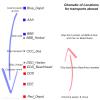
-
In case of the modding objects you must use the mod files, I can up mine when back home. However you should consider not use mod objects as there is basically no reason for them to use which couldnt do a default object aswell.I can see sometimes the reason of modplanes but even those are almost never used by me. Means I am using th emod only for effects, not for additional content. However it is everyones own decision. Good to know the campaign is working now.
