
Gus
-
Posts
333 -
Joined
-
Last visited
-
Days Won
10
Everything posted by Gus
-
When they´ve found out about this setting here: BETTER 3d in VR ( greater depth ) I had applied it and the 3-D effect in VR was immediately improved, much more defined with better depth perception. Recently I´ve update the Nvidia driver and after a few VR session, I had the feeling, that the image looked better before the driver update. It was like a bit washed out or blurry. Then remembered that setting in the Nvidia inspector, which was rejected after the driver updated, so applied again, as in the video below and 3-D became perfectly defined as before. It´s just a 2-click-job after downloading Nvidia insepector with absolutely no downsides and the improvement is significantly ... at least for me. Highly recommendable for VR. If you don´t see any improvement, then it must have another cause ... it´s working.
-
They´ve found out, that the trailer is made with the Marianas map... they find out everything!
-
It was really a surprise, that after the recent patch 13 for Elite Dangerous, Open Composite and OpenXR Toolkit is running fine with it. Befoe the patch it didn´t run with OpenXR. I´m not sure if I even had to replace the openvr_api.dll, but the OpenComposite routine had to be executed to switch from SteamVR. I´m into Elite Dangerous in VR since the very first days of it´s appearance as a crowdfunding project, but it never looked as good and smooth as now with OpenXR. Very relaxing and beautiful game...
-
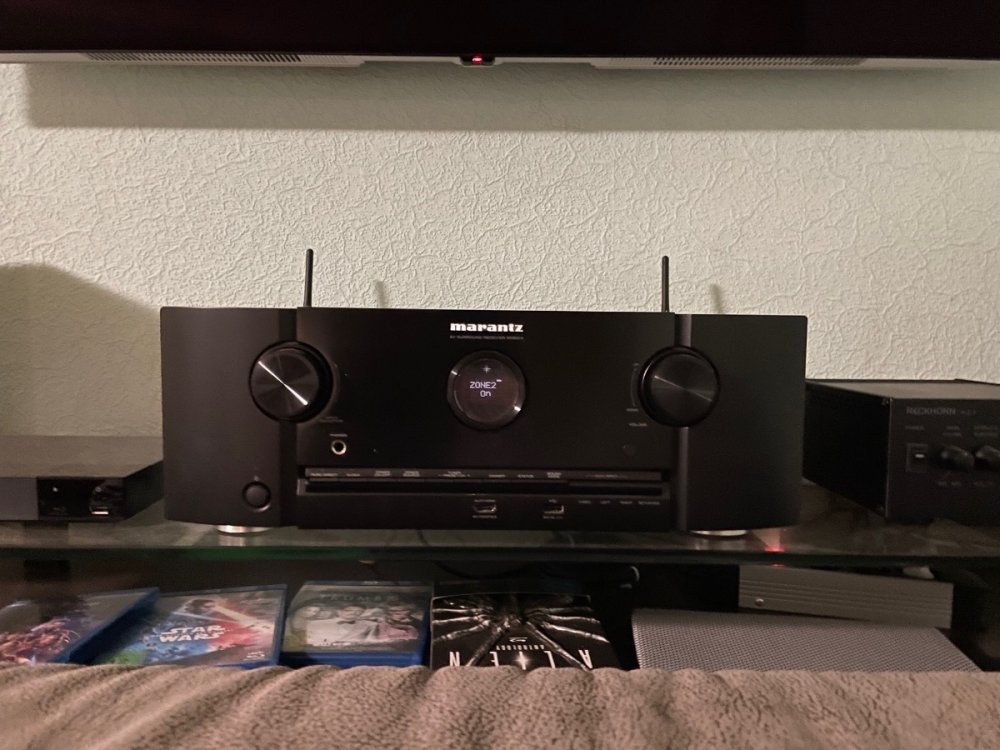
Congratulations for your birthday and for the vintage Marantz amplifier / radio! Have you let estimate its value for nowadays ... must be very high. I love my Marantz SR 5014 - best sound ever! Had Denon and Sony amplifiers before, decades ago, but you can´t compare them to the nuanced sound of a Marantz! I got configured the SR 5014 for two zones, 1st a stereo boxes setup for Music and TV, 2nd the homecinema with beamer and 5.1 setup. You could direct every source to one or the other or both zones at the same time.
-
Me too, Lip! Only got DCS, MSFS2020, IL2 and Elite Dangerous on that PC. Set up everything for VR.
-
... just found this video with some good explanation and advices in the first ten minutes for the Nvidia driver settings. Should be valid for DCS and IL2 as well.
-
listening to five songs per day make your day happier...
-
Have you mapped the VR center button in IL-2 or DCS to the same center button in VRnecksafer? It must be the same button in the game and VRnecksafer.
-
If there would be a quality VR headset with a slim design in the price range of the Reverb G2 with 160° FOV and lenses with edge-to-edge clarity, I would be already happy. That and graphics cards with 2 GPUs designed for VR applications especially, to provide the performance needed for high end VR.
-
Didn´t even looked for the price tag But interesting how far the technology is with mixed reality nowadays...
-
Just wanted to share this new Youtube Video. It´s showing the XTAL 3 VR headset with mixed reality capability and everything else state of the art VR tech. The XTAL 3 got 90° vertical FOV, 180° horizontal and 2 x 4K displays with custom lenses ( no fresnel, no lens distortion ). To achieve this wide FOV the displays are canted. Quite impressive and looks like the most advanced VR headset today!
-
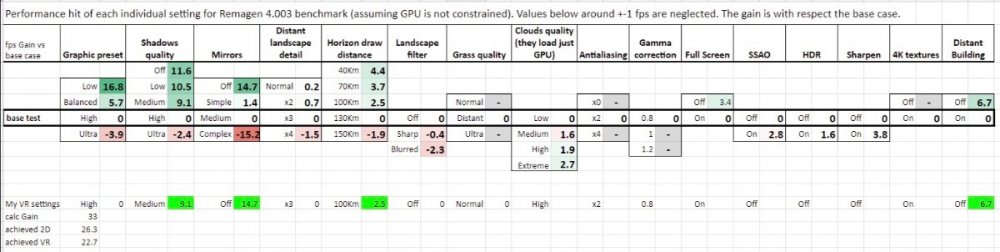
... that´s weird - the Nvidia driver options never appeared any other to me for decades. Maybe it´s kind of reduced default driver for a Notebook on your side. This one option does make colors look more vivid to me in VR, but before starting to worry too much, I would just ignore this option - it´s by far not a must have or something. Maybe downloading manually the newest full Nvidia driver and installing it would bring us on the same page of the Nvidia driver setting; maybe it´s only an option somewhere to check for bringing up all options of the Nvidia driver, who knows ... If spending time with fiddling with the options, I would go first for finding a satisfying balance between graphics fidelity and performance in VR. Here´s a small overview on the difference demands/ gains of performance by the graphics options in IL-2: it´s a download from the IL-2 forums.
-
Hi Lipfert, thanks for sharing the video stream. I´ve set the sharpening in OpenXR toolkit to 70% meanwhile, because at 100% it appeared too grainy to me, too hard edged, but that´s just personal taste ... As you get between 60 and 70 FPS, have you tried to deactivate shadows and set MSAA to 0 to reach 90FPS? Maybe also reducing visible range to 120 instead 150. Video streams of VR can´t mirror how image quality is perceived in VR, but for me it makes a big difference if IL-2 is running at 90FPS compared to 60 - 70FPS - the feel of speed and fluidness at 90FPS is much more enjoyable to me. Not quite observable instantly, like shadows on or off, but definitely on the longterm of flying in the sim. There is also a setting in the Nvidia driver, which is always overlooked: It´s in this page shown above and must be named in english something like dynamic range: By default it is set to ´limited´. Setting it to ´full´ has got a big impact on how the colors appear. After each installation of a new Nvidia driver, I have to set it to "full" manually. The downside of this setting to full is visible for example at night time flying in the light of the moon, which casts different shades, of which are visible separated of each other. Don´t know how to describe in better words - I´m sure there is a special word for this effect. I can live with that, as I don´t fly at night time in the sim


-
Yeah, "Atomic Blonde" is a great movie. Me also loved the secret agent story in the setting of East/West Berlin at that time. I was quite young, around 14 too, when we visited relatives in East Berlin before the wall fell. We went by car over Checkpoint Charly. Surreal is a perfect description! While West Berlin is quite modern, you passed the border and drove through old empty streets in east Berlin with buildings in which the bullet holes from world war 2 are still present. Later my father explained to me, that the U-Bahn is constantly full of StaSi employees an IMs incognito, watching every step of each one traveling with the U-Bahn. Charlize Theron as an action-star is just WOW! There is a spectacular fighting scene in the end, which is shot in one take, no cuts!, what makes it incredible intense on the screen. So far I only saw, that they have done this in "Ong Bak 2".
-

SPOILERS!!! Top Gun Maverick Discussion Thread
Gus replied to Shadepiece's topic in JG1 Videos & Screen Caps
For me it was the first time since two years watching a movie in cinema. I was very happy, that it was kind of old-school action movie instead of another blockbuster from Marvel Studios or something with Dinosaurs, Aliens or Disney´s Star Wars. "Flight of the Intruder" by John Milius might be also a movie you would like, but it plays in the Vietnam era and the characters in there are completely stereotypes, but it´s also a good and exciting movie. -
OpenXR support for IL-2 and DCS for Windows Mixed Reality VR headsets
Gus replied to Gus's topic in Technical Support
Some thoughts on … How Motion Reprojection works with OpenXR Toolkit background Everyone knows, that VR is very demanding for performance and very sensitive on how visual quality in VR is perceived. The high demand for performance results of the high frame rates needed to run a modern VR headset as intended ( defined by the Hz frequency of its displays ). The most common value is 90Hz for most of the VR displays, means any VR application need to run at 90 FPS to work optimal ( some newer Oculus headsets work with 80Hz, Pimax and Valve Index headsets could be set to 120Hz or 144Hz ). Running a 90Hz VR headset significantly below 90FPS causes stutters in the process of a fluid and continous projection of each computer generated frame within the frequency of 90Hz, which may result, at least on longer VR sessions, nausea effects and/or uncomfortability, because instead of monitor/flat screen the eyes are only few centimeter from the display and the brain is shut off from real world impressions. In game stuttering isn´t welcome anyways, but much more sensitive in VR. In view to that high demand for performance the first and still most of VR games provide less graphical fidelity for example by low-fidelity ´comic´-graphics ( without perfomance demanding textures ) and/or simple gameplay-mechanics to save cpu-processing and gpu-graphics processing power in order to make the VR games run optimal at 90FPS on low and midrange systems. With DCS World and IL-2 Sturmovik we are on the very other end of the spectrum regarding the demand for CPU and GPU processing power. general To balance out this high demand for performance but keeping a fluid ( smooth ) image processing for 90Hz VR headsets to keep VR a comfortable experience, Oculus invented an algorythm, which forces the render process to create only 45FPS instead of 90FPS. Each of these 45 rendered images then is copied and re-projected between each real rendered image. In result in the headsets is seen a constant and fluid 90Hz/90FPS smooth image continuity, but the CPU/GPU only need to render 45FPS and the reprojection algorythm fills the 45 real rendered frames with 45 copies of a before rendered real frame up to 90FPS. Reprojection processes 1 real Frame, 1 copied frame of that real frame before, then one real frame and again 1 copy of that real frame to reach 90 frames per second on the 90Hz displays of the VR headset but with half of the demanded performance of the GPU/CPU. SteamVR adopted this algorythm. Microsoft as well adopted the algorythm for OpenXR, but with some differences. If motion reprojection is set to ´automatic´ in SteamVR or Microsofts OpenXR developer tool, the algorythm measures the GPU/CPU frametime constantly. If these frametimes exceed a fixed value, which is needed to guarantee constant 90fps, it switches automatically to the need of 45FPS instead and re-projects each rendered frame as a copy as described before to provide the fluidity/smoothness of 90Hz for the eyes. For SteamVR this threshhold is around 10% below the targeted frequency, means: if you are running a HP Reverb with SteamVR and the CPU/GPU can´t maintain between 81 - 90FPS, reprojection switches automatically to 45FPS, but you keep the smoothness of 90Hz in VR ( 45 real frames + 45 copied frames ). OpenXR reprojection has got two more threshholds, but the frametime windows to switch is more tighter in my observation. If set motion reprojection to ´automatic´ in Microsoft OpenXR developer Tool, it switches automatically from 90FPS to 45FPS slightly below 90FPS ( at around 87FPS ). If the 45 real rendered frames can´t be maintained, OpenXR switches automatically from 45FPS to 30FPS slightly below 45FPS and creates 2 instead of 1 copy of a real rendered Frame to fill up the 90Hz frequency ( 30 real rendered frames + 2 x 30 copied frames ). If the 30 real rendered frames can´t be maintained, OpenXR switches automatically from 30FPS to 22,5FPS slighty below 30FPS and creates 3 copies of a real rendered Frame to fill up the 90Hz frequency ( 22,5 real rendered frames + 3 x 22,5 copied frames ). Don´t ask me how 0,5 frame may look like, but this is how the algorythm works. downside of reprojection The big advantage of reprojection is to guarantee a smooth image without stutters at 90Hz in VR. The downside is occasionally visible: If reprojection works within its parameters ( maintaining 45FPS all the time for SteamVR/OpenVR and in first step for OpenXR ) there is no difference visible in the image quality of slow moving objects from the point of view, like looking at the ground from 10.000 ft. Or watching aircrafts from 20 miles distance. It depends how fast a object is moving in the frames you are looking at. Reprojection gets visible for example by flying very low with high speed over a city with many buildings, while you´re looking at your 3 or 9 o´clock Position ( left or rigt out of the cockpit ). At this Point of View objects are passing very fast through the Point of View. Example: Flying low level over Beirut in DCS and looking to the left out of the cockpit focussing on the closest building. This building will pass in less than a second the point of view, means the game engine has got 90 frames per second to render this movement properly to the point of view. If reprojection is activated, there are only 45 frames really rendered in that second and the remaining 45 frames are copies, what results in a ´ghosting´ effect, while the object passes the point of view. The ghosting effect is the result of a frame staying longer in the POV because the frame is just a copy and therefore the same frame as that one before. The same is when passing other aircrafts very close or when rotating fast around the own aircraft in external view. In IL-2 Sturmovik this downside effect of reprojection appears a bit different in my observation. At a POV as described in the example above, there is not so much a ghosting effect, but more a ´warping´ effect of that focused close object, like a flip book the object jumps from one position to the next during the pass. In IL-2 in my opinion - please verify with your own experience - reprojection also has got a downside for proper aiming and shooting at the enemy aircraft - to me it appears much easier without reprojection in IL-2, so I would recommend to disable motion reprojection in IL-2, as IL-2 is anyways less demanding than DCS and 90FPS are reachable, when reducing the graphics fidelity like shadows, high ground textures, mirrors, MSAA , etc. in the ingame settings. For DCS instead, even with the most demanding ingame graphics settings reduced or turned off, 90FPS are unthinkable ( at least on my system with a RTX3090 and 100% render resolution ), therefore reprojection should be always on in DCS. Also reprojection in DCS hasn´t got a such noticable downside effect as in IL-2 in my experience. In DCS with current ingame graphics settings, I could maintain solid 45FPS with the Harrier and some older modules. The newer modules switch by OpenXR to 30FPS, what is worse than 45FPS regarding the ghosting effect due to motion reprojection, but provides an overall smooth and stutter-free experience as well for the high performance demanding newer Modules. Motion Reprojection settings in the OpenXR Toolkit There are two lines in the OpenXR Toolkit to set motion reprojection: Motion Reprojection: DEFAULT, ON or OFF Lock motion reprojection: ( unlocked / 45 / 30 / 22,5 ) The good thing of the OpenXR Toolkit is, that it overrides the settings of Microsfts OpenXR developer tool and it saves the setting for the game in which you adjust the motion reprojection with the OpenXR Toolkit This is really nice, as you don´t have to reset motion reprojection every time when starting another game. Line 1. DEFAULT: I´m not sure, as I didn´t test it, if „DEFAULT“ does do that, but I would assume, if set to „DEFAULT“ it won´t override the Motion reprojection Settings in Microsoft OpenXR developer tool ( where you could set motion reprojection to „deactivated“. „automatic“ or „always on“ ). Line 1. ON: well, it´s on. But it overrides the setting in the Microsoft OpenXR developer tool. If you are in DCS and set the motion reprojection setting in the OpenXR Toolkit to ON, it saves that setting for DCS. If set in the Toolkit in IL-2 to „OFF“ the Toolkit saves that setting for IL-2 and you never have to switch the motion reprojection setting before starting DCS or IL-2 again unless you want to. „ON“ also means, that OpenXR motion reprojection works with the two additional steps to 30FPS and 22,5FPS as described above. Line 2. UNLOCKED means the locking process for motion reprojection is deactivated, motion reprojection works with its intended functions by default, like set in Line 1. to „ON“ Line 2.: „45“ or „30“ or „22,5“ locks the reprojection to one of the possible steps it provides, means: if set to 45 you will always get 45 FPS, no matter if the system reaches 90FPS - it is locked at 45FPS always. This counts as well for the other step; if locked to 45 it won´t step down to 30FPS step, if the frametime exceeds the threshhold, instead if you are dipping below 45FPS, let´s say at 38FPS, you will get 38FPS but with significant stutters, because it tries to create 45 copies of only 38 real rendered frame, what results in a mess. I´ve tried that quite a while for DCS and it turned into a mess when switching from the Harrier to the Viper and flying low level or in high demanding scenarios with the Viper then, because the Viper couldn´t maintain 45FPS most of the time, while the Harrier could. So, locking at 30FPS works the same, you will always get no more than 30 FPS with 2 copied frames. Same applies for 22,5 in that way. Some recommendations to deal with motion reprojection in OpenXR Toolkit Start DCS in VR, open OpenXR Toolkit and set motion reprojection to „OFF“. DCS needs to be closed and restarted to take effect. Then set the FPS Counter in OpenXR Toolkit on, to observe the real rendered frames your system is capable of. Fly around in some stress situations with high workload for the graphics processing and observe the average FPS the FPS Counter is showing. No matter how much it stutters at this Moment, just have a look on the FPS counter. It shouldn´t go below 30FPS, if it goes below 30FPS, then reduce some ingame graphics settings to result in stable 30FPS or above. You surely reach much higher FPS at 30.000 ft. over the sea, but you don´t want to have a bad VR experience in DCS in low level flight or at start or landing with your favourite aircraft. There is this last step in OpenXR motion reprojection at 22,5FPS, but that is not really something to aim for…at least for me. After the FPS counter confirms, that you don´t dip below 30FPS, turn reprojection to „ON“ and restart DCS. Set the 2. Line to ´unlocked´. The algorythm decides by its measurements of the performance demand to which step in reprojection it needs to turn, what works very good with OpenXR in DCS and avoids turning DCS into a stuttering mess. It is barely noticabel when OpenXR reprojection switches from 45FPS to 30FPS, but you should enjoy an overall smooth and fluid VR image processing all the time. My recommendation for IL-2 Sturmovik is different: Start IL-2 in VR, open OpenXR Toolkit and turn motion reprojection to „OFF“. Restart IL-2 and turn the FPS Counter in the OpenXr Toolkit on. Try to reach and maintain 90FPS by reducing ingame graphical settings as shadows, ground textures, 4k Textures, Mirrors or MSAA as much as you are comfortable with the graphic fidelity. Another method is to make use of the Upscaler ( FSR ) in the OpenXR Toolkit to get more performance to reach and maintain 90FPS at any costs. The very last switch to adjust, is reducing the renderscale in Microsft OpenXR developer Tool, but this reduces visual quality and clariness in VR and may induce shimmering effects on thin lines, but try to get 90FPS in IL-2 at any cost. ( reducing the renderscale could be also done by the override function in the Toolkit, but I didn´t tried that out ) There are no advices to whatever makes a very personal VR experience enjoyable. Try some variations, like motion reprojection "ON" in IL-2 and decide by your own, but I thought it may be helpful to know how motion reprojection works, to better deal with it. -
SPOILERS!!! Top Gun Maverick Discussion Thread
Gus replied to Shadepiece's topic in JG1 Videos & Screen Caps
Yeah, there were a lot of references back to the original Top Gun, like photographies everywhere and scenes, like Rooster playing piano and singing "Great Balls of Fire" in the bar or the scene, when Mavericks drives his motorbike along with the rolling Hornet at the runway - it was a bit like Top Gun Maverick lacks of an identity of its own by bringing the original Top Gun back in mind such often. It´s for sure no easy task to resurrect Mavericks character after 30 years, but that is something the movie did very believable. Most of the time he appeared like a broken hero or was made as such by the others. He carried his personal drama until the very end, when he and Rooster were in this hopeless situation in the Tomcat without bullets and about to get shot by the Su-57, Maverick said "Forgive me Goose", which was a great drama moment in the movie and connected the original story with the new one on a deeper level of its charcaters. I also like to fly the Tomcat and Hornet in DCS and enjoyed the action scenes in the movie very much, but in total the action scenes were approx 15 or 20 minutes in total. So what do we see in the remaining 120 minutes of the movie? I know, that my perspective may sound ridicoulus to many, but when it´s about movies I´m more interested in the drama, characters and the story than in the action scenes. It was just kidding saying that Penny might be the mentor, gate keeper or trickser - those are just some archetypes in movies, which goes back to the greek drama ( I think it was Aristoteles, who defined these archetypes for the greek stage play ). But you could find these archetypes and their relations to the hero in nearly every movie - Top Gun Maverick isn´t an exception there: without a doubt Maverick himself filled the role of the Mentor for Rooster, the commander of the base was the gate keeper, who decides if the hero could go on, to fullfill his task or puts obstacles in the way of the hero to fullfill his task ( the commander did both ) and Hangman was the archetype of the trickser ( he also fills the role of the competitor, Iceman had in the original Top Gun ). Penny´s role appeared very shallow to me in Maverick. maybe they were in need to cut out very much, what could have explained their relation much better or at least bring some tension into this relation. Very different for Charly in the original Top Gun, who was kind of investigator or observer from the Navy with a higher rank than the pilots, what made the love affair kind of forbidden and gives a lot of tension to it. There was a lot of passion, when they finally had their moment together, which was also a kind of rebellion against their formal relation in the movie - there is no drama without a conflict. More than that, the role of Charly played a lot with breaking up traditional female roles, it couldn´t be more escalated than bringing a women into a superior position in that men occupied domain of fighter pilots ( btw. her man like forename also points to breaking up the gender roles ). What really bothered me in Top Gun Maverick was that the script was obviously rewritten to present the Military/Navy in another way, the story and drama of Top Gun Maverick was intended. There was a contract between the studio and the defense department or Pentagon, in which the studio paid a ot of money to use the real Hornets and be allowed to put actors in the real Hornets. I´m pretty sure that the defense department also put the the right for a final word into the contract on how the Navy is presented and they didn´t liked, that being a fighter pilot is a very dangerous and life threatening job, what is the true understanding Rooster has to get through to solve the difficult relation he had with Maverick. I´m sure Roosters line "Maverick hindert me from going to the acadamy" was replaced afterwards, otherwise this deep conflict between both wouldn´t make any sense. After Rooster attained this understanding that being a fighter pilot is very risky and that is why his father died, he got deeply feared about fullfilling his task as pilot. You only see this fear twice: 1st scene on the deck of the carrier, when Rooster was completely sweated in fear of his task minutes before they start ( Maverick was more than before his mentor in this scene, telling him to not think, just do, what he is prepared for ... or something like that ). The second time his massive fear to die showed, when he falls back while flying through the canyon, but then, and that is the true hero moment, he overcome his fears and pushed forward; finally got back into this danger to save Maverick. But these movements of the hero were kind of covered and turned into the opposite by the line "he hindert me from going to the academy" in favor for the presentation of being a fighter pilot at the military - what a pity, as it ruined the drama and the reflection of becoming a hero if the characters are overlooked. -
SPOILERS!!! Top Gun Maverick Discussion Thread
Gus replied to Shadepiece's topic in JG1 Videos & Screen Caps
Me always asked myself while watching Maverick: Who is she? What does she add to the story? Is she a mentor? Is she a gate keeper? Is she a trickser? And where does she sail with that boat now? -
OpenXR support for IL-2 and DCS for Windows Mixed Reality VR headsets
Gus replied to Gus's topic in Technical Support
Just saw an interesting tweak in this video. he is starting to talk about it from min. 1.45 on ... The file he edited could be found in_ ../IL-2 Sturmovik Great Battles/data/startup.cfg This ´startup´- file could be opened with an editor. Under section ( KEY = graphics ) line 10 and 11: full_height = 768 ( or whatever value is there should be changed to your headsets native resolution ) --> changed to 2160 for HP Reverb ( G1 and G2 ) full width = 1280 ( or whatever value is there should be changed to your headsets native resolution ) --> changed to 2160 for HP Reverb ( G1 and G2 ) Now the image quality looks really much better, but honestly, I´ve played around yesterday very much with the sharpening, that I can´t say now if the improvements result from this or that. There´s in anyway improvements visible, what is very nice. -
OpenXR support for IL-2 and DCS for Windows Mixed Reality VR headsets
Gus replied to Gus's topic in Technical Support
Just played a bit around with the Upscaler in the Toolkit with DCS... Man, what a difference! Everything is such crisp and clear through the ´sharpening´...incredible! I can´t believe, never made use of this option before as it is such an improvement in visual quality. The landscape is such beautiful now - you could easily spot the runway miles away from 20.000ft. Spotting other aircrafts in the sky is very much improved. And the cockpit ´wear and tear´ is much better pronounced. Just try the following in the OpenXR Toolkit: Upscaler set to FSR Size to 88% ( for example, but it´s what I´ve just set spontaneously ) Sharpening: 100% <--- THAT´S THE ONE!!!! Through the image has become massively crisp, there are induced some tiny shimmering effects on very small thin lines here and there - nothing to bother about for me and not really recognizable as a downside, but those tiny shimmerings surely had been coverer before by a standard overall bluriness without additional sharpening in comparison. Really recommend to try this out and make a view of your own. Easy to switch back or adjust those setting to ones likings. Will try what the sharpening effects could do for IL-2 next ... ... so, after checking the sharpening effects with IL-2, I came to conclude, that it is not so much pronounced as in DCS on the first view. While the ground and assets look a bit less foggy, there is not so much of change visible there. But this has to do with less graphical fidelity in IL-2 of the maps like Stalingrad or Moscow ( on the other hand, this is why IL-2 perfroms much, much better in VR than DCS ). Also the wasn´t so much a change visible in the IL-2 cockpits, as those are in anyway very sharp and detailed ( using 4K textures in IL-2 ). But where the sharpening effect shines in IL-2 is on the aircraft models. So much more detailed in external view and the view on other warbirds. Spotting is improved and identifying more easy with more sharpened and detailed aircraft models. When a swarm of P-47´s and P-51´s engange dirctly from the front and passing close with high airspeed it just felt much more realistic and faster to me as you could observe very small details on the opponents, when they are passing close. Also hunting a train on the ground, the train looks much better as it is sharper and better visible. Haven´t looked yet at the Rheinland map with a few more hills or attacking ground assets. In DCS the effect is much more visible due to the much more detailed landscapes and cities of the Nevada map and Syria. How the Upscaler in OpenXR Toolkit works There are three option belonging to the Upscaler: 1. Upscale to choose from ´none´, ´NIS´, ´FSR´ NIS is Nvidia developed upscale method, which works with Nvidia cards only. FSR is AMD developed upscaler, which works with both Nvidia and AMD cards. The Internet says FSR is the much better and more performant upscaler method compared to NIS, so FSR seems to be the one method to choose from. 2. Size With the size could be defined the image resolution which should be rendered and then upscaled from there to the target resolution. 100% size is exactly the target resolution ( in my case approx 3160 x 3060 for HP Reverb G2 set to 100% renderscale within the OpenXR developer tool ). If set the size in the OpenXR Toolkit upscaler to 88% the GPU renders an image size of approx 2700 x 2700 and the FSR upscaler algorythms scales the set size of approx 2700 x 2700 up to 3160 x 3060. By this the render process frees performance, means you´ll get more FPS. How much more differs. on system and settings. It is said, that the Upscaler is more efficient on mid- and low-range system and less efficient on high end systems. The purpose of the upscaler in anyway is to get more performance, while maintaining the visual quality of a high resolution image. 2.b There is also an ´Anamorphic´ option which could be set to ´on´ or ´off´. With this setting the width and heights of the image could be scaled individually. Didn´t tried that out, as I don´t see the need to use it. But it provides the possibilty to only scale the pixel count in the width or heights of the image. Wouldn´t expect the image to be streched horizontally or vertically as anamorphic means it would be then adjusted back to the format image ( like 16:9, 4:5 or in case of the HP Reverb 1:1 defined by the main API OpenXR developer tool ). I would leave Anamorphic at ´off´ to keep the process of use easier. 3. Sharpening That surprised a lot in DCS and improved the image crispness and clarity very much. It also cost a bit of performance, which could be balanced out by adjusting the uspcaler size as in point 2. There were several mods before for DCS like ´Reshade´ among others, which provide more sharpness in VR, but with the OpenXR toolkit it is now very easily doable with very good results in sharpness and performance. I´ve set to 100%, but could be dialed down for individual setting. I would start with the sharpening set to 100%, observing then the FPS counter, if performance got lost through the process, while getting a much, much sharper image and then get back the lost FPS by dialing down the upscaler size. Looks like these two functions work very good in combination in the OpenXR Toolkit. -
SPOILERS!!! Top Gun Maverick Discussion Thread
Gus replied to Shadepiece's topic in JG1 Videos & Screen Caps
Interesting detail, but her connection to the original Top Gun didn´t played out in Maverick. -
SPOILERS!!! Top Gun Maverick Discussion Thread
Gus replied to Shadepiece's topic in JG1 Videos & Screen Caps
Just saw the movie and it is a good one! The first scenes are really good, in which Cruise´ character was introduced and the conflicts of the character were well exposed, within only few lines of dialogue embedded in the tension of those scenes. Those first scenes are very important for the movie and here they were perfectly introduced into the main character and plot. Also Mavericks very own premise is consistent until the end. That´s quite interesting, as the character arc, means the journey of the hero, wasn´t Maverick, but it was Rooster who changed, overcome his inner demons and become the real hero of the movie. But it was also a bit constructed: the conflict between Maverick and Rooster is explained, in the way that Maverick prevented Rooster from going to the Academy, what costs Rooster four years… a bit ridiculous to serve as the core of Roosters conflict with Maverick. The death of his father was explained as an accident, so Maverick couldn´t made responsible and wasn´t made responsible by Rooster. It would have been better if they would have left the explanation, that Maverick prevented Rooster from going to the Academy as it denies the real conflict which lies underneath both: the death of Goose, Rooster´s father. It could have been worked out better, that Rooster did overcome making Maverick responsible for the death of his father, when he has learned, that being a Fighter Pilot is very dangerous, with a high probability to get killed in action. Maybe it is overlooked easily by the audience but a key for Roosters character to change his mind against Maverick. So, chapter two in the movie, after the character and conflict introduction in chapter one, was very much constructed with no progress in the plot or the characters. Also the goal to destroy the bunker in the mountains was clear from the beginning and predictible until the end, without any twist. While I´ve waited for the twist in chapter two, it suddenly came unexpected with the death of Mavericks protector Iceman and in consequence Maverick was immediately rejected from the task: a desperate Situation for the main character, but his actions in the first scenes as a test pilot to safe the DarkStar project foreshadowed his ongoing actions to solve the desperate situation, he is facing at this point. Well, it is all very much constructed by the book, but it works and there are no experiments allowed by the studios for a multi-million Blockbuster movie like this. Jennifer Connelly is a great actress. For me she is like Harry Dean Stanton: a movie in which one of those are acting, can´t be a bad movie! In Top Gun Maverick she is far below her value as an actress, unfortunately. More than that her character seems to be created by the AI in modern screenwriting software, which creates a love interest automatically and puts it in, in the right intervals/screentime - a pity and kind of waste of Connellys talent. The third chapter was really impressive, in a way never seen before in cinema. The action was such exciting - it felt like a constant emotional impact watching the pilots fighting in the Hornets. That was definitely the heartbeat of TopGun Maverick and it was the fastes heartbeat you could experience in a movie. Quite an experience! Maybe the truth of this movie, its expression of our times, lies exactly in the heartbeat of the fighting scenes in the third chapter. The feeling of a world too fast to keep up. Getting killed within seconds by most deadly machines the world ever saw. Something which was themed in the beginning, that humans ( in the subtext ) respectively human pilots belong to the past and more efficient machines take over the fights and decide upon life and death within milliseconds. Like in these action scenes the pilots, as well the audience, just loses control and overview of the thread automated machines or most modern 5th gen fighter jets put on the opponents. In this expression of the time we´re living in Top Gun Maverick differentiate very much from the original Top Gun Movie. Where Top Gun Maverick´s relationships between the characters are very formal with kind of oppressed feelings and a world too fast with machines such efficient, that humans can´t handle it anymore ( like flying with 10G ), the world and times of the original Top Gun was a world of challenge and rebellion against the hierarchical systems ( which was the tragedy of the original Maverick character ), as well a time of sexual freedom of orientation and playing with homoerotic staging. Yes, Tarantino was right in his views describing Top Gun from that perspective, but he was wrong concluding Top Gun is a gay movie - it isn´t, it was that time in the 80s and 90s of new sexual orientation of the youth and the easiness to play with. If looking at the popcultural expression of that time, you will find references to this freedom all over the place, in Music in Art and maybe Top Gun as the most prominent reference in cinema. But there has nothing been left of that time in Top Gun Maverick, no easiness, no experimentation, no rebellion anymore, kind of artificial happiness, when the team of Top Gun Maverick is playing Football on the beach and with a scary perspective for the future. Alright, I know, the regular DCS Pilot will see the movie different. It´s a good movie in anyway and I just hope, one day we could look back with a smile from different times to remember the times, we are living in today. -
OpenXR support for IL-2 and DCS for Windows Mixed Reality VR headsets
Gus replied to Gus's topic in Technical Support
But this has not to do with OpenXR in 1st place, I would assume, but with the resolution of your headset and the resolution you´ve scaled in the API ...