Vonrd
Moderators
-
Joined
-
Last visited
Everything posted by Vonrd
-
FIST FIGHT! FIST FIGHT! FIST FIGHT IN THE PARKING LOT!
-
Love it!
-
I saw lots of F-4 Phantoms looks like the A-4 might be made official (wonder how much they'll charge?) along with the F4U it looked like probable AI Zero and Betty? They'll need a straight deck... LA-5? F-15? Napalm?
-
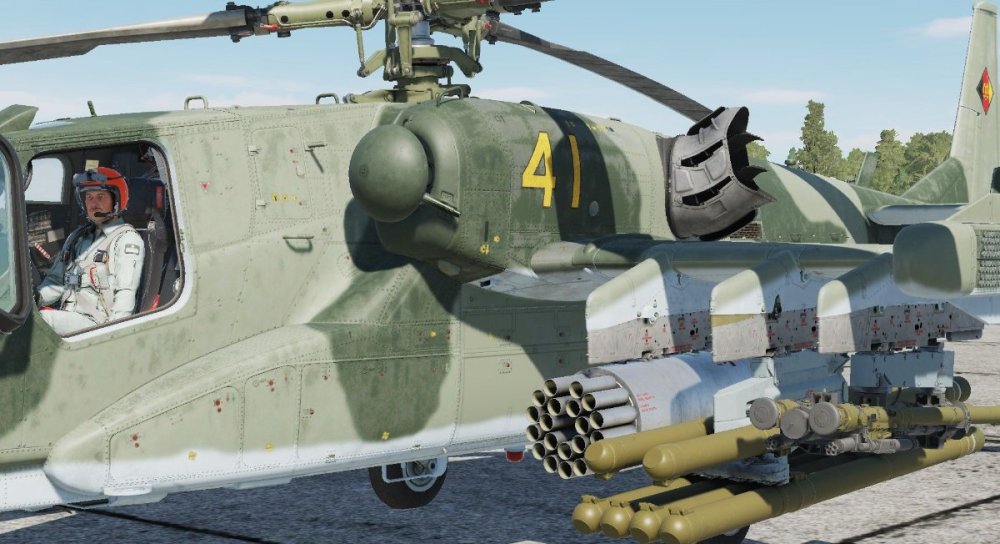
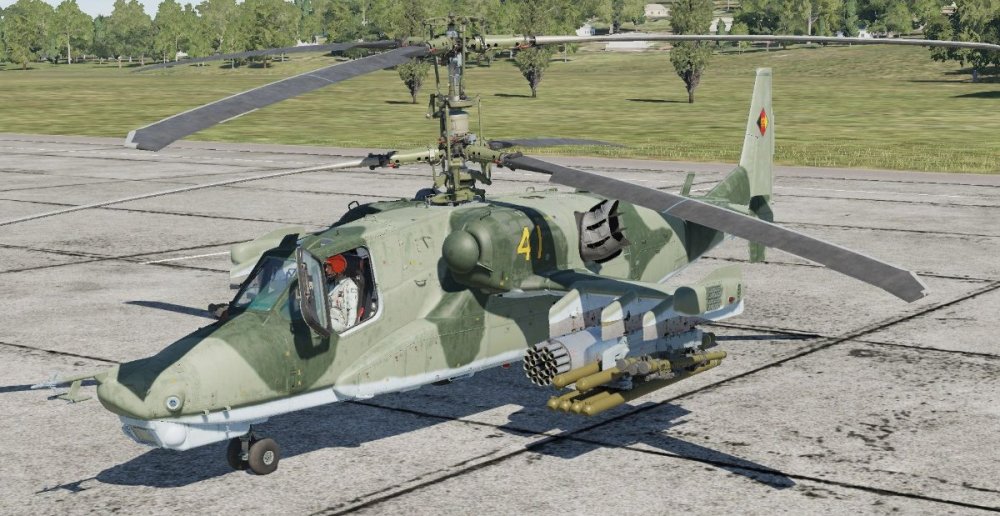
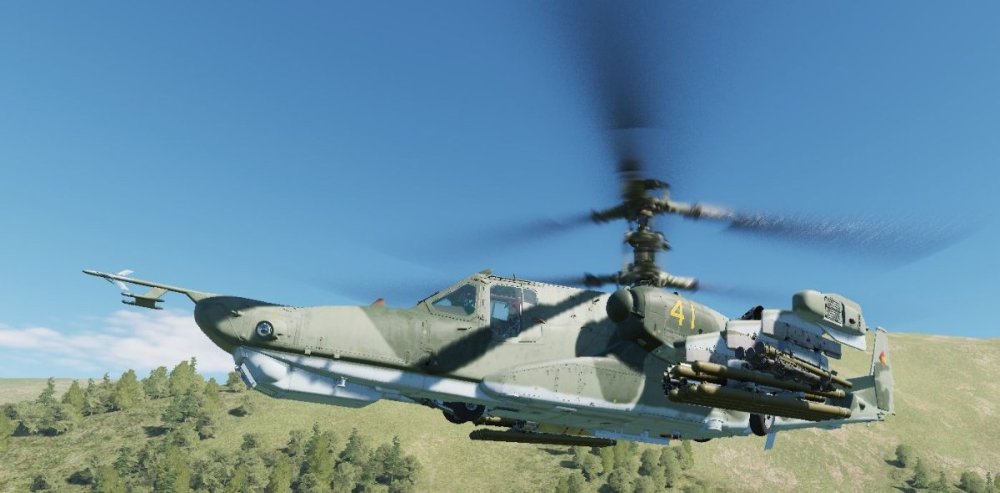
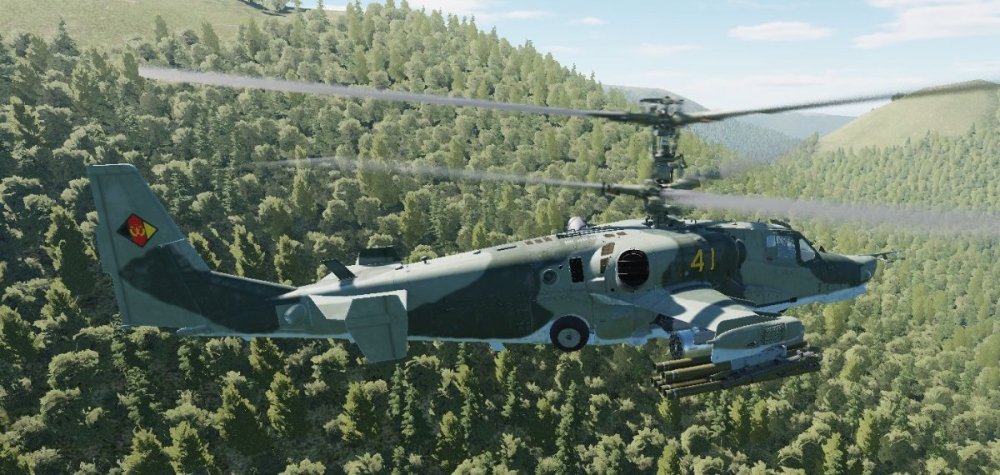
Blackshark 3 Fictional East German Skin includes East German pilot. Uploaded to DCS User Files but I don't have a link yet... awaiting approval my moderators. I've attached the zip file here. Official Template hasn't been released yet so I made my own. It's fairly basic but if anyone wants it I'd be happy to provide it. Ka-50_3 East German Fictional.zip

-
@Greif - I uninstalled using Windows Add / Remove Programs and then had to delete an Openkneeboard file in the Registry located here: Computer\HKEY_LOCAL_MACHINE\SOFTWARE\Khronos\OpenXR\1\ApiLayers\Implicit I'm going to wait a while before trying Openkneeboard again since it seems that others are having the same issue as I saw in the OpenXr Discord. Maybe there will be a fix in a future update.
-
I found it. It was OpenKneeboard.
-
This is the log file. I've highlighted what appears to be issues with DirectX 11. [OXRTK] 2022-12-31 15:05:50 -0800: OpenXR Toolkit - GA-2 (v1.2.3) [OXRTK] 2022-12-31 15:05:50 -0800: dllHome is "C:\Program Files\OpenXR-Toolkit" [OXRTK] 2022-12-31 15:05:50 -0800: OpenXR-Toolkit layer is active [OXRTK] 2022-12-31 15:05:50 -0800: Using layer: XR_APILAYER_NOVENDOR_XRNeckSafer [OXRTK] 2022-12-31 15:05:50 -0800: Using layer: XR_APILAYER_FREDEMMOTT_OpenKneeboard [OXRTK] 2022-12-31 15:05:50 -0800: Runtime supports extension: XR_KHR_win32_convert_performance_counter_time [OXRTK] 2022-12-31 15:05:50 -0800: Runtime supports extension: XR_KHR_D3D11_enable [OXRTK] 2022-12-31 15:05:50 -0800: Runtime supports extension: XR_KHR_D3D12_enable [OXRTK] 2022-12-31 15:05:50 -0800: Runtime supports extension: XR_KHR_composition_layer_depth [OXRTK] 2022-12-31 15:05:50 -0800: Runtime supports extension: XR_KHR_composition_layer_color_scale_bias [OXRTK] 2022-12-31 15:05:50 -0800: Runtime supports extension: XR_MSFT_unbounded_reference_space [OXRTK] 2022-12-31 15:05:50 -0800: Runtime supports extension: XR_MSFT_spatial_anchor [OXRTK] 2022-12-31 15:05:50 -0800: Runtime supports extension: XR_MSFT_perception_anchor_interop [OXRTK] 2022-12-31 15:05:50 -0800: Runtime supports extension: XR_EXT_win32_appcontainer_compatible [OXRTK] 2022-12-31 15:05:50 -0800: Runtime supports extension: XR_EXT_conformance_automation [OXRTK] 2022-12-31 15:05:50 -0800: Runtime supports extension: XR_MSFT_composition_layer_reprojection [OXRTK] 2022-12-31 15:05:50 -0800: Runtime supports extension: XR_MSFT_spatial_graph_bridge [OXRTK] 2022-12-31 15:05:50 -0800: Runtime supports extension: XR_MSFT_spatial_anchor_persistence [OXRTK] 2022-12-31 15:05:50 -0800: Runtime supports extension: XR_EXT_palm_pose [OXRTK] 2022-12-31 15:05:50 -0800: Runtime supports extension: XR_MSFT_scene_understanding [OXRTK] 2022-12-31 15:05:50 -0800: Runtime supports extension: XR_MSFT_scene_understanding_serialization [OXRTK] 2022-12-31 15:05:50 -0800: Runtime supports extension: XR_FB_display_refresh_rate [OXRTK] 2022-12-31 15:05:50 -0800: Runtime supports extension: XR_EXT_eye_gaze_interaction [OXRTK] 2022-12-31 15:05:50 -0800: Runtime supports extension: XR_MSFT_hand_interaction [OXRTK] 2022-12-31 15:05:50 -0800: Runtime supports extension: XR_EXT_hand_tracking [OXRTK] 2022-12-31 15:05:50 -0800: Runtime supports extension: XR_EXT_hand_joints_motion_range [OXRTK] 2022-12-31 15:05:50 -0800: Runtime supports extension: XR_MSFT_hand_tracking_mesh [OXRTK] 2022-12-31 15:05:50 -0800: Runtime supports extension: XR_MSFT_controller_model [OXRTK] 2022-12-31 15:05:50 -0800: Runtime supports extension: XR_KHR_visibility_mask [OXRTK] 2022-12-31 15:05:50 -0800: Runtime supports extension: XR_EXT_samsung_odyssey_controller [OXRTK] 2022-12-31 15:05:50 -0800: Runtime supports extension: XR_EXT_hp_mixed_reality_controller [OXRTK] 2022-12-31 15:05:50 -0800: Application name: 'OpenComposite_DCS', Engine name: '' [OXRTK] 2022-12-31 15:05:50 -0800: Detected OpenComposite [OXRTK] 2022-12-31 15:05:50 -0800: Using OpenXR runtime Windows Mixed Reality Runtime 112.2211.2002 [OXRTK] 2022-12-31 15:05:50 -0800: Using OpenXR system Windows Mixed Reality [OXRTK] 2022-12-31 15:05:50 -0800: Ignoring XR_MSFT_hand_interaction for Windows Mixed Reality Runtime 112.2211.2002 [OXRTK] 2022-12-31 15:05:50 -0800: OpenXR Toolkit - GA-2 (v1.2.3) [OXRTK] 2022-12-31 15:05:50 -0800: dllHome is "C:\Program Files\OpenXR-Toolkit" [OXRTK] 2022-12-31 15:05:50 -0800: OpenXR-Toolkit layer is active [OXRTK] 2022-12-31 15:05:50 -0800: Using layer: XR_APILAYER_NOVENDOR_XRNeckSafer [OXRTK] 2022-12-31 15:05:50 -0800: Using layer: XR_APILAYER_FREDEMMOTT_OpenKneeboard [OXRTK] 2022-12-31 15:05:50 -0800: Runtime supports extension: XR_KHR_win32_convert_performance_counter_time [OXRTK] 2022-12-31 15:05:50 -0800: Runtime supports extension: XR_KHR_D3D11_enable [OXRTK] 2022-12-31 15:05:50 -0800: Runtime supports extension: XR_KHR_D3D12_enable [OXRTK] 2022-12-31 15:05:50 -0800: Runtime supports extension: XR_KHR_composition_layer_depth [OXRTK] 2022-12-31 15:05:50 -0800: Runtime supports extension: XR_KHR_composition_layer_color_scale_bias [OXRTK] 2022-12-31 15:05:50 -0800: Runtime supports extension: XR_MSFT_unbounded_reference_space [OXRTK] 2022-12-31 15:05:50 -0800: Runtime supports extension: XR_MSFT_spatial_anchor [OXRTK] 2022-12-31 15:05:50 -0800: Runtime supports extension: XR_MSFT_perception_anchor_interop [OXRTK] 2022-12-31 15:05:50 -0800: Runtime supports extension: XR_EXT_win32_appcontainer_compatible [OXRTK] 2022-12-31 15:05:50 -0800: Runtime supports extension: XR_EXT_conformance_automation [OXRTK] 2022-12-31 15:05:50 -0800: Runtime supports extension: XR_MSFT_composition_layer_reprojection [OXRTK] 2022-12-31 15:05:50 -0800: Runtime supports extension: XR_MSFT_spatial_graph_bridge [OXRTK] 2022-12-31 15:05:50 -0800: Runtime supports extension: XR_MSFT_spatial_anchor_persistence [OXRTK] 2022-12-31 15:05:50 -0800: Runtime supports extension: XR_EXT_palm_pose [OXRTK] 2022-12-31 15:05:50 -0800: Runtime supports extension: XR_MSFT_scene_understanding [OXRTK] 2022-12-31 15:05:50 -0800: Runtime supports extension: XR_MSFT_scene_understanding_serialization [OXRTK] 2022-12-31 15:05:50 -0800: Runtime supports extension: XR_FB_display_refresh_rate [OXRTK] 2022-12-31 15:05:50 -0800: Runtime supports extension: XR_EXT_eye_gaze_interaction [OXRTK] 2022-12-31 15:05:50 -0800: Runtime supports extension: XR_MSFT_hand_interaction [OXRTK] 2022-12-31 15:05:50 -0800: Runtime supports extension: XR_EXT_hand_tracking [OXRTK] 2022-12-31 15:05:50 -0800: Runtime supports extension: XR_EXT_hand_joints_motion_range [OXRTK] 2022-12-31 15:05:50 -0800: Runtime supports extension: XR_MSFT_hand_tracking_mesh [OXRTK] 2022-12-31 15:05:50 -0800: Runtime supports extension: XR_MSFT_controller_model [OXRTK] 2022-12-31 15:05:50 -0800: Runtime supports extension: XR_KHR_visibility_mask [OXRTK] 2022-12-31 15:05:50 -0800: Runtime supports extension: XR_EXT_samsung_odyssey_controller [OXRTK] 2022-12-31 15:05:50 -0800: Runtime supports extension: XR_EXT_hp_mixed_reality_controller [OXRTK] 2022-12-31 15:05:50 -0800: Application name: 'OpenComposite_DCS', Engine name: '' [OXRTK] 2022-12-31 15:05:50 -0800: Detected OpenComposite [OXRTK] 2022-12-31 15:05:50 -0800: Using OpenXR runtime Windows Mixed Reality Runtime 112.2211.2002 [OXRTK] 2022-12-31 15:05:50 -0800: Using OpenXR system Windows Mixed Reality [OXRTK] 2022-12-31 15:05:50 -0800: Ignoring XR_MSFT_hand_interaction for Windows Mixed Reality Runtime 112.2211.2002 [OXRTK] 2022-12-31 15:05:50 -0800: Using OpenXR resolution (no upscaling): 3160x3092 [OXRTK] 2022-12-31 15:05:51 -0800: Using Direct3D 11 on adapter: NVIDIA GeForce RTX 4080 [OXRTK] 2022-12-31 15:05:51 -0800: Early initializeInterceptor() call [OXRTK] 2022-12-31 15:05:51 -0800: Open menu with CTRL+F3 [OXRTK] 2022-12-31 15:05:51 -0800: Projection calibration: 0.04737, -0.00397 | -0.04505, -0.00573 [OXRTK] 2022-12-31 15:05:54 -0800: D3D11Device destroyed [OXRTK] 2022-12-31 15:05:54 -0800: Session destroyed [OXRTK] 2022-12-31 15:05:54 -0800: Using Direct3D 11 on adapter: NVIDIA GeForce RTX 4080 [OXRTK] 2022-12-31 15:05:54 -0800: Early initializeInterceptor() call [OXRTK] 2022-12-31 15:05:54 -0800: Open menu with CTRL+F3 [OXRTK] 2022-12-31 15:05:55 -0800: Projection calibration: 0.04737, -0.00397 | -0.04505, -0.00573 [OXRTK] 2022-12-31 15:05:55 -0800: Creating swapchain with dimensions=3160x3092, arraySize=1, mipCount=1, sampleCount=1, format=29, usage=0x31 [OXRTK] 2022-12-31 15:05:55 -0800: Creating swapchain with dimensions=3160x3092, arraySize=1, mipCount=1, sampleCount=1, format=29, usage=0x31 [OXRTK] 2022-12-31 15:08:28 -0800: Opening menu [OXRTK] 2022-12-31 15:09:47 -0800: Opening menu [OXRTK] 2022-12-31 15:11:03 -0800: Opening menu [OXRTK] 2022-12-31 15:11:57 -0800: Opening menu [OXRTK] 2022-12-31 15:23:05 -0800: D3D11Device destroyed [OXRTK] 2022-12-31 15:23:05 -0800: Session destroyed
-
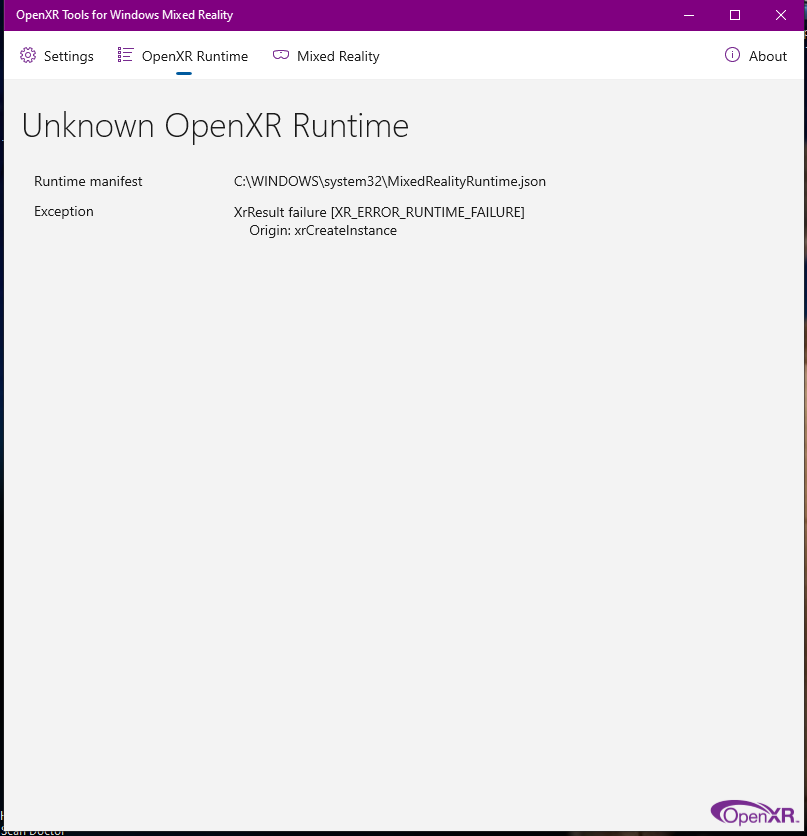
Went to play in VR today and my openXR says “XrResult failure (XR_ERROR_RUNTIME_FAILURE) Origin: xrcreateinstance(&createinfo, instance.put) I’ve tried rebooting and uninstalling openxr. Never had this issue before, any ideas? On Reddit, someone said: "Have you just installed the NIS (Nvidea Image Scaling) mod? I have the same issue straight after installing NIS, and when I uninstalled NIS, all good again." I don't have NIS activated in either NVidia Control Panel or NVidia GeForce Experience. Anyone have any idea what's causing this?

-
Strange but fascinating
-
Merry Christmas everyone! 🎁
-
-
@Monkee Sounds like you would be a good fit! @Klaiber ,our CO should be responding soon but please be patient since it's the Holiday season.
-
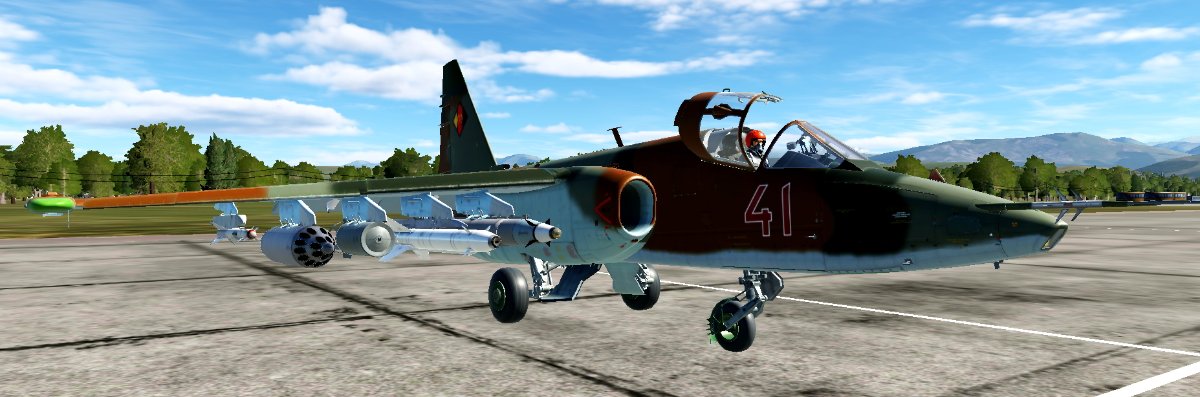
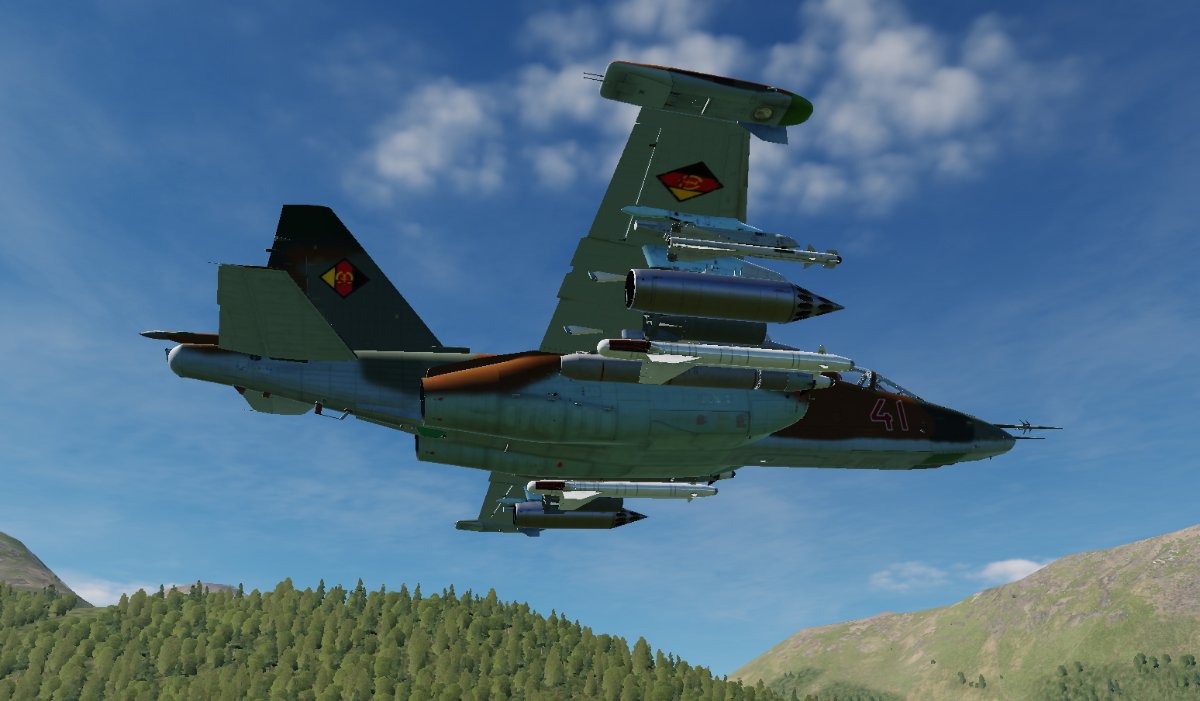
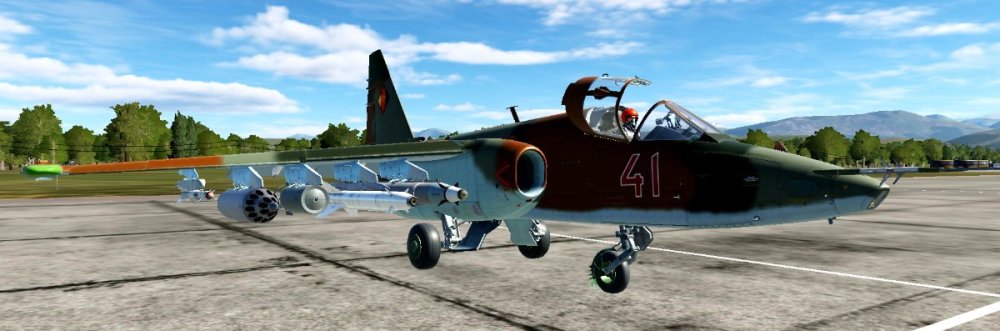
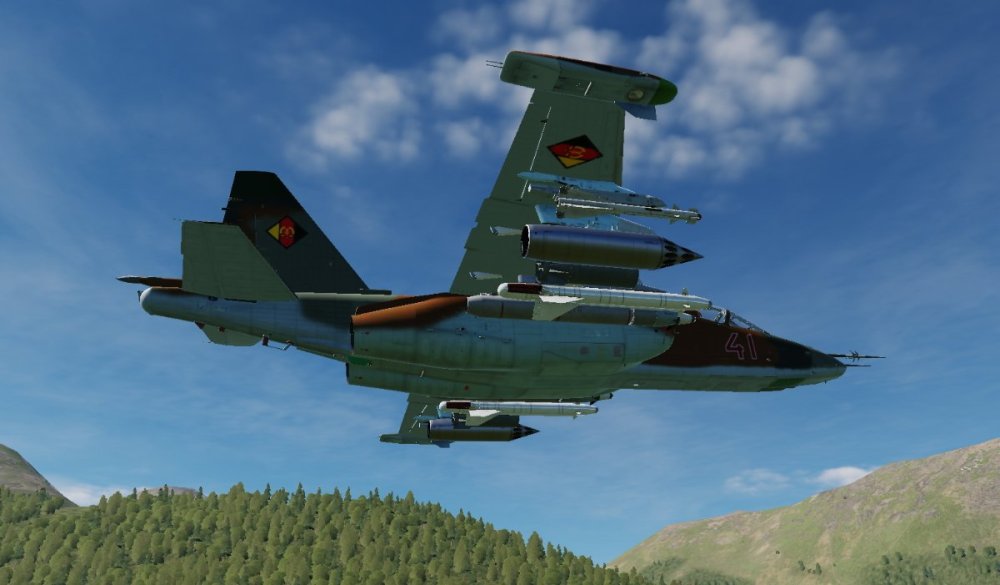
Fictional East German Su-25 skin. The Bort numbers are locked at only 2 digits but I don't think that's much of an issue. If needed, I can make two versions with a 4 and a 5 as first digits hard painted on but that means twice the space needed on your drive. Available at DCS User Files as well as here: https://www.dropbox.com/s/mhgoda6ozndj0lz/East German Fictional.zip?dl=0


-
RTX 4080
-
Take a look at this (there are other positive reviews out there as well): I tried it but couldn't positively identify which window was my AIO pump and didn't want to take the chance that it would be ramping up and down. (He says to run the pump at a constant appx 60% speed but his explanation is pretty vague). I'm leaving everything as set in BIOS for now but I would like to have a way to monitor temps in real time and also have a way to get notifications if temps are getting high. I saw somewhere that you can link RGB components to temp. My case fans have RGB but I have them off currently. I have no use for the bling but if they could be related to temps, I would be in for it.
-
I have an older version of MSI AB on my old machine but I'm not using it on the new one. I have no intention of OC anything at this point. Thanks for the heads up.
-
Nope, I have one started though and I'll make one for the plain Su-25 also.
-
Hmm, thought I had done one. I'll check. If not, it'll be on the way soon.
-
What software do y'all use for controlling fans / AIO pump and monitoring temperatures?
-
$101.3 million Hopefully it will buff out though... 🤑
-
Nope, same issue tonight. PTT doesn't work. Keyboard "Q" does but trying to locate that key while in VR is not an option for me. So far it looks like I'll only be able to use TS as Voice Activation. I refuse to fly that way. I can only use TS for the initial meeting. Will have to use Discord for flying. I'm sorry to be the instigator for not using TS actively but I've tried everything that I can. I'm really pissed at TS management for not doing ANYTHING about this issue since it seems that it affects many users since 2020.
-
Update: Tried it again with Moxy after practice tonight. It "may" be that I have to initiate it by using "Q" keyboard. After that, it worked fine with the Hotas key. I'll check it again next time we have people on TS comms.
-
Actually there were several categories / modules that use "Q". I went through all of them (even the ones I don't currently fly, just to be sure, and deleted all. Same in IL-2. I'll have to remember to go through other games like Tobruk, MSFS, etc to check for "Qs".
-
I'm not the only one with this issue. This thread goes way back to May 2020. TS response has been BS and many of these people are justifiably pissed off. Most issues seem to happen after a PC upgrade or new build. I bit the bullet and am using JoyToKey to make the Hotas button emulate a keystroke. It works but I have to go through all of my control settings to make sure my choice of "Q" isn't mapped to something... especially "Eject" 😲 https://community.teamspeak.com/t/hotkey-on-gamepad-joystick-steering-wheel-can-not-be-set/8316
-
I had installed it earlier. Still getting the double buttons.