
Flyboy
-
Posts
1,697 -
Joined
-
Last visited
-
Days Won
121





Flyboy's Achievements





-
 Vonrd reacted to a post in a topic:
RL Aviation Posts
Vonrd reacted to a post in a topic:
RL Aviation Posts
-
Well I didn't expect this to be my first video on my Flyboy Ops YouTube channel, but was told by flight control they caught my landing into Miami today so I found it, clipped it, and put it as the first video on my new channel.
-
In order to download any attachments you have to register on the forum.
-
Player's Guide version 2.26 Changelog Commander Recon Scouts (see Commander’s section in the Player Guide) - Commanders can now place a Recon Scout directly from the placement menu, at a staging zone or any owned zone — a cheap, disposable ground recon option separate from the aircraft-deployed Special Unit Scout. - Cost: 1 credit. Stock is 2 per coalition per event day, on its own replenishment track — entirely separate from the normal Special Unit Scout inventory. Buying one never competes with or reduces the other. - Exempt from both the 4-per-staging-zone cap and the 30-group force cap. A single vehicle should never have to compete with a real combat purchase for a slot. - Same detection behavior as the standard Scout: same sensor range, same recon markers, same marker-charge limit per deployment. - Earns no points of any kind — no marker points, no extraction bonus, no team score. Its only value is the shared coalition intel it produces. - It's a real, vulnerable target: if destroyed, the enemy earns the normal 20-point Scout kill credit. - Cannot be returned to inventory once placed — committed for the day like any other commander placement past its reset window. - Persists to the next event day under the standard 40% force-survival rule — as a single vehicle, that means it simply has to still be alive at day's end to carry forward at no additional cost.
-
## TeamOps Syria YK2 Players Guide — v2.25 Changelog **§5.7 Blue Package Reference: LAV-25 replaces M113** Mixed A and Armor B compositions updated to match the current Mission Editor templates. *Why:* ground-balance testing found the M113 too weak against Red's T-62/BMP-1, so Blue's mechanized packages were upgraded to the LAV-25. **New §5.13 Ground Force Doctrine section** Added after Strategy Fundamentals — strengths, weaknesses, and attack/defense doctrine for both coalitions' ground forces, plus a "Recognizing and Breaking a Stall" guide. - *Why the doctrine:* Blue's M-60/LAV-25 crews carry a deliberate training edge over Red's T-55/T-62M/BTR-60/BMP-1 crews — matched in numbers, and Red's Soviet-supplied equipment isn't inferior on paper. The advantage is specifically better gunnery and fire discipline, not better hardware, so each side needs a different approach: Blue wants range and prepared positions, Red wants close-in mobile fights and to force Blue out of position. - *Why the stall section:* a prolonged fight with no shots fired usually means something fixable — blocked line of sight, poor positioning, or low ammo — not that everyone's out of the fight. Includes a specific tip that artillery can go quiet on a valid target for no clear reason, and a short move order often gets it firing again.
-
Stuka reacted to a post in a topic:
TeamOps Syria YK2 (1975)
-
Uploaded new player's guide above. Changelog (since script 1.086 / Players Guide 2026-06-01) **Campaign, zones, and commanders** - Zone threat alerts: two-stage armor approach/breach warnings on every owned zone, with distinct voice callouts and a yellow (approaching) / orange (breached) map label - Commander Transport Unit Deployment: commanders can now deploy and return troops/vehicles directly at any owned airport, FARP, or FOB — no helicopter required — organized into GH Zones / Other Zones submenus - Commander Engineer Transfers (Low Population mode): redistribute Engineers between owned zones without a transport aircraft - Unused commander budget now carries over to the next event day; a budget-balance bonus (up to +10) helps a trailing coalition catch up when the score gap exceeds 40% - Owned-zone commander placement opened to any owned non-capital zone; placement capacity is tied to that zone's current supply level **New: end-of-day force persistence threshold.** - A commander-placed or zone-defender group must retain at least 40% of its original strength when the event day ends to carry over — below that, the group does not persist. A qualifying group is fully reconstituted to original strength for the next day, not just its survivors - Warehouses reworked: a Logistics Offline zone (all warehouses down) now blocks loading *and* returning units to inventory there — Engineer is the only exception, either direction. Supply delivered to a destroyed warehouse queues a 30-minute repair and still earns full points - Driving a Combined Arms ground vehicle no longer resets your aircraft sortie state, pending points, or CSAR status **Reconnaissance** - Unified recon envelope for all Recon-tagged aircraft and helicopters: 20-3,000 m AGL, no speed restriction - Recon scoring rebalanced (~80% reduction in raw values) so the sortie cap requires genuine map coverage rather than a couple of lucky zones - Airborne recon detection latency cut from up to 10 seconds to about 1 second - Ground spotters (JTAC, Scout, Spy, SpecOps) produce instant map markers — no RTB required **Special-unit intelligence** - Target intelligence is now shared and canonical across FAC, Recon, JTAC, Spy, SpecOps, and Scout — any eligible source can refresh or invalidate another's mark - Detected groups now show SAM / AAA / EWR tactical labels (classification hardened so radar-guns show AAA, search/track radars show EWR, launchers show SAM — no more misclassification) - JTAC, Spy, and SpecOps scans are one-time snapshots, not continuous live sensors — a new scan is needed to refresh contacts - Marker and badge cleanup overhauled — a watchdog and kill-event hooks now reliably clear stale intel instead of leaving orphaned marks on destroyed targets **Special-unit ROE** - SpecOps, Spy, JTAC, and Engineer teams now default to Weapons Hold in every mission phase; Scout vehicles default to Return Fire **Downed pilots and CSAR** - Ejection and CSAR pending-point handling rebuilt for reliability — your 75%/25% split survives crash/ejection event-ordering quirks, respawns, and multicrew ejections cleanly - Multicrew CSAR: the second pilot from a two-seat ejection now spawns offset from the first instead of stacking on top of them - Friendly downed pilots show an exact marker and badge to their own coalition; the enemy coalition sees only an approximate grid-based "CSAR?" label until a Spy or SpecOps scan reveals the exact position - Combat-zone CSAR bonus (+50) is now side-aware — Blue only inside the Syria DMZ belt, Red only inside the Israel DMZ belt - Enemy pilots can be captured by helicopter or by a Spy/SpecOps team in the field; capture pays half recovery value plus full CSAR bonus, friendly rescue pays full recovery plus full CSAR bonus - New "Downed Pilots" menu with sorted friendly/enemy lists, bearing, and distance - Eject vs. Despawn clarified and rebalanced: despawn forfeits everything (0%), ejecting credits 25% immediately — if your aircraft is crippled, eject rather than despawn **Spy and SpecOps operations** - Committed away-missions (sabotage, rescue, capture) now go fully off-map for their duration and return survivors near the insertion point when complete - Mission risk now scales with target danger — success, detection, and casualty odds are all higher against a harder target - Supply sabotage risk is now explicit and scales with how many supplies you target (1/2/3): higher-value hits carry both worse detection odds and a real chance of losing the team if discovered - Spy and SpecOps scans can now detect enemy Spy/SpecOps teams operating nearby — a valid defensive/counterintelligence use for either role **SAM and ground-force changes** - The old custom SHORAD missile-limiter framework has been removed entirely — the SA-9 (used by both coalitions now) and all other SAMs use fully native DCS firing, guidance, and reload behavior - Zone-threat armor detection scales to each zone's actual defense geometry, with a two-stage (approaching / breached) response **Transport and artillery** - Mi-24P added: 2-pilot CSAR capacity plus 8-troop transport (no vehicle crates) - C-130J-30 Super Hercules added as a valid logistics transport, alongside the helicopter fleet - Engineers can now be stationed forward at non-capital zones, persist there across event days, and (in Low Population mode) transfer between zones without a transport aircraft **Player statistics and FAC** - FAC scoring overhauled: FAC now earns full kill value on an assisted kill (was 50%), the sortie-action point cap was removed (max ~120 non-assist points per sortie), and each unit in a marked group can earn its own assist - Fixed: My Stats now correctly shows your live FAC pending points while still in flight (previously showed 0 until RTB) - Population Mode (Standard / Low Population) added for smaller sessions — halves SpecOps/Spy scan and mission times, speeds up deployment token regeneration and sabotage recovery, and (as of the latest script) increases JTAC's smoke loadout from 10 to 15 charges - JTAC scripted smoke corrected to orange, matching FAC - Tournament Rules mode added for admin-run competitive sessions (locks coalition switching, enables special missions automatically) --- Players Guide — complete rewrite The Players Guide has been rebuilt from the ground up since the June 1 PDF — new structure, full page numbering, inline images throughout every section, four new appendices, and dozens of accuracy passes reconciling every mechanic described above against the actual script behavior. Notable additions: a Strategy Fundamentals section for commanders (classical and operational command principles, plus the new 40% persistence-threshold guidance), a smoke/flare color quick-reference table, a slot-naming-convention breakdown, and explicit sabotage-risk odds tables. **English Players Guide (v2.24):** *Russian and German versions are being retired for now given the scope of this revision — they'll return once translated against the new English source.*
-
 Klaiber reacted to a post in a topic:
[FIX] Meta Quest 2 disconnect issue.
Klaiber reacted to a post in a topic:
[FIX] Meta Quest 2 disconnect issue.
-
Flyboy reacted to a post in a topic:
Flying Humor
-
I like my Pimax Crystal lite and I think price has come down. I keep hearing all kinds of problems people have with the Quest so for that reason alone it might be worth it. Plus I think visuals are better. Patriot used to have the Q3 and switched to the crystal lite also.
-
 Flyboy reacted to a post in a topic:
News regarding Wags from ED
Flyboy reacted to a post in a topic:
News regarding Wags from ED
-
 No this was the first time and was prob from an update.
 -
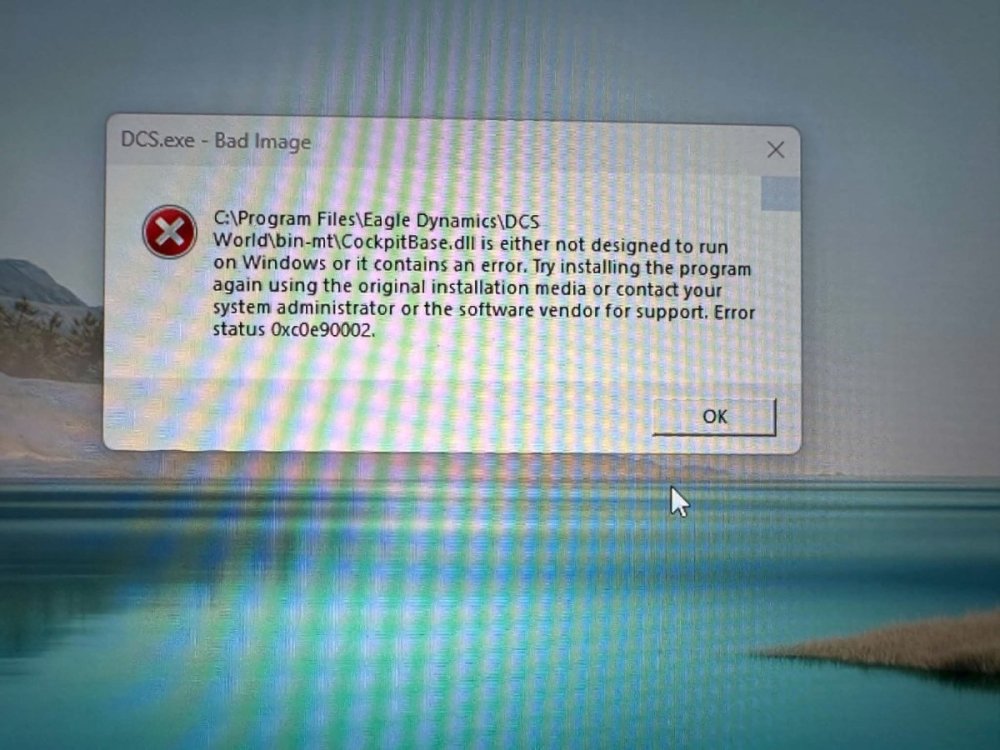
I had the following error when I tried to load DCS the other day. Traced it using AI, which fixed it. Here is ChatGPT summary: If DCS shows this error: DCS.exe - Bad Image ...\DCS World\bin-mt\CockpitBase.dll ... Error status 0xc0e90002 the DLL is usually not damaged. Windows Smart App Control is blocking it under its Code Integrity policy. A DCS repair may not fix it because the repaired DLL is still considered untrusted by that Windows policy. Fix: Open Windows Security. Go to App & browser control. Select Smart App Control settings. Set Smart App Control to Off. Restart Windows and launch DCS. This does not remove DCS files, modules, settings, or licenses. Windows Defender antivirus and firewall remain active. It only disables Smart App Control’s extra reputation/signature enforcement layer. Note: Turning Smart App Control off is normally one-way; turning it back on later requires a Windows reset/reinstall. Keep Defender enabled and avoid running unknown downloads.
-
Mods needed for this mission: A-4E and Bronco OV-10 A-4E https://community-a-4e.github.io/ https://github.com/Community-A-4E/community-a4e-c/releases/ Bronco OV-10 https://splitair.gumroad.com/l/fwzxn Note: You can put zero in the price and get it for free.
-
Got to fly it a little today before I go off to work for 6 days. It's ok, same frustrating (though maybe a little improved?) control setup. Graphics aren't bad in VR. I was getting 45 fps with DLSS OpenXR quality setting. Better than the original IL2 but I can't say it's better than DCS. Flies ok but difficult in dogfight against an F-80 (I was in Mig-15). Seemed to tie into my AB9 force feedback but Moza doesn't have a config for it yet so it needs tuning. Overall though controls aren't the best. Basically the same setup as what IL2 does. No clickable cockpit and didn't get to mess with the command wheel much but same basic complicated wonky control setups needed for oil/water radiators, superchargers etc etc that you find in IL2 WW2 that is more difficult to manage because of no clickable cockpit. Maybe you can setup each plane, but I didn't see that option. There is a quick start setup where you can choose a quick mission and parameters similar to the old IL2 but mission editor isn't on the main menu as far as I can tell. I dread that it's too similar to the old IL2 and might have to download a mission editor etc? Anyway that is just my quick take with maybe 15-20 min flying and 30 min messing with control setup.
-
And creating scripts using AI is a game changer.
-
I have it now but haven't flown it. Fatal really likes it. I put it on my mission and training maps. Spud Spike posted some training vids recently that I'm hoping to watch this weekend.
-
Welcome! Yes you may be interested in this unique scenario we are planning so feel free to join us at our next “open house” testing this Friday and Saturday (come to one or both as you can). I put together a players guide in English, German and Russian and you can find more info here:
-
Check the post link above for the plane set. I’ll be adding the F-100 since it’s out now. My server is usually active anytime and most of the time it has the training map up. I don’t think I have a password now but if there is it is usually jg1. Server Name: Flyboy's TeamOps | Fox3ms.com V9-72 IP Address: 147.135.72.72 Port: 10308
-
Before totally giving up on DCS you should try it with us sometime. I’ve got a really cool mission event setup just starting to promote. We will be doing a practice on it tomorrow night at 2100 ET