


Jaus
-
Posts
319 -
Joined
-
Last visited
-
Days Won
5
Everything posted by Jaus
-
Ah, the tab. Thanks
-
I don't see an NVIDIA setting that refers to "Global". Is that in MSFS?
-
Thanks, apparently you do need to map it to buttons, and not in the regular RPM controls but rather the "Propeller RMP: high pitch/low pitch' controls.
-
IL2
-
Is there a trick to getting this to work? I have mapped an axis on my throttle quadrant to manual prop pitch for 'all engines' and 'engine 1'. For other aircraft it seems to be working, but for the FW, which need to be set to manual pitch mode, I can make the switch to manual mode but the axis is not recognized for setting the pitch amount.
-
I think that is a reason Butzell was setting up the next Flanders on one of the WWII Russia maps. The Arras map doesn't have enough flat, smooth, cleared ground.
-
Lipfert I'm trying your settings now. So far I seem to be getting very similar framerates in WWI aircraft, but I do see some small stuttering particularly in the horizon when rolling back and forth on the deck. It also occurs at times when making tight turns over a city at rooftop level. The funny thing is it does not always appear to be connected to framerate. I may go back to MSAAx4 as I hate jaggies.
-

OpenXR support for IL-2 and DCS for Windows Mixed Reality VR headsets
Jaus replied to Gus's topic in Technical Support
Discovered what appear to be a big plus since switching o OXR. Distant aircraft used to disappear when zooming in. I went on Flugpark yesterday and found that zooming in on small ac actually worked properly for the first time since I adopted VR. Still very small aircraft, but at least you could still see them and they were a couple pixels bigger. -
OpenXR support for IL-2 and DCS for Windows Mixed Reality VR headsets
Jaus replied to Gus's topic in Technical Support
Got OpenXR set up. Not sure if it's a game changer for me, but it certainly is an improvement in vr graphic customization. I'd kind of equate it to Reshade for VR. So far I have opted to use FSR, add contrast and a little saturation/vibrance, and adjust color balance to give a more pleasing result on my monitor. The results have improved the 'washed out' effect, but the biggest improvement so far seems to be an fps boost. Still need to see how it affects GPU/CPU temperatures, and install neck saver. -
That was it. I had completely forgotten I had installed some steam apps in a different hard drive. Thanks, I see the .exe now.
-
I have a reverb G2. I do see a WMR for SteamVR (beta) in my library. Is that bad?
-
I finally figured out the dashboard. I had turned it off when I started using VR because I couldn't figure out how to close it once it was on screen, then completely forgot about it. I've re-enabled it and found that I can let it start with SteamVR and close it by pointing a controller off of the dashboard and pulling the trigger. Forcing DX11 didn't make a difference for me in my acid test (FC - "Airfield Defense" mission, 15+ AC and buildings nearby). 50-60 fps at the start of the mission is what I had been getting. I'll keep observing in FPSVR. Never have found that .exe.....
-
Here is my C:\Program Files (x86)\Steam\SteamApps\common\ folder. I've also searched it for instances of "openvr" and only turned up some "openvr_api.dll"s scattered around

-
I'll post a screenshot of my /steamapps/common folder when I get a chance. Labroisse, are you talking about a dashboard you see on the monitor or in the headset?
-
Hmmm, I'm not seeing either of these options. What is the starting point from which you access the "VR Dashboard" ? Is that a separate software? I also don't see the \MixedRealityVRDriver\ folder in the path Snaggle quotes.
-
I tried : - turning on headset - start steamvr -start controllers (which appeared in the steam vr environment) Tried all possible movements of both controller sticks and all buttons, but I could not get any response other than the normal vr menu which does have a gear, but it just takes you to windows settings. Did I miss anything?
-
Ok, I think I remember that. I don't think I've used the cotrollers but once or twice since I got the G2.
-
What is the WMR control panel? I've never seen that and google didn't produce any results.
-
A few years ago while trying to get home from Costa Rica I had a flight that was delayed for 12 hours due to 'volcanic ash'. While on the flight I happened to talk to an attendant who explained what actually happened. It seems the evening before the plane was in Miami destined for San Jose, Costa Rica. It was to spend the night there and be available for the flight back to the US in the morning. When the flight was approaching San Jose they were told they couldn't land due to volcanic ash and told to divert to Liberia airport (smaller, but still able to handle passenger jets) about two hours away. They landed at LIberia where they were told they could not deplane because there were no immigration agents at Liberia to receive the passengers from the US. They spent two hours on the tarmac and were ultimately told that they were denied entry into Costa Rica. The plane, with all passengers still on board, returned to Miami.
-
FIF 2022 "Winter Campaign" Registration (Flying Circus)
Jaus replied to Klaiber's topic in FIF Registration
JG1_Jaus JG1 US Eastern Your certainty of attending: (as of now) Week A1 (Saturday, 5 March 2022): Yes Week A2 (Saturday, 12 March 2022): Yes Week A3 (Saturday, 19 March 2022): Yes Week A4 (Saturday, 26 March 2022): Yes -
Changed wing pattern in DFW skin (above)
- 217 replies
-
- 1
-

-
- skins
- flying circus
- (and 1 more)
-
It has been my motif to leave the wings in their stock camo pattern. In this case it does kinda look like a failed attempt to match the greens. I could switch the wings to one of the lozenge camo patterns.
- 217 replies
-
- 1
-

-
- skins
- flying circus
- (and 1 more)
-
DFW skin. Yeah, I don't have a lot of imagination...... v_!_JG1_DFWC5_Jaus.dds
- 217 replies
-
- 1
-
-
- skins
- flying circus
- (and 1 more)
-
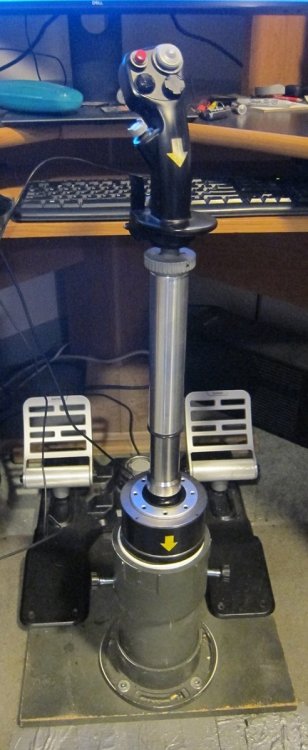
I have an extension setup, not from Sahaj, but the same idea. Highly recommended if you have the space for the added stick travel. Allows for finer movements of the aircraft IMO. I use a 20cm spring on my 30cm of extension and find that I like the lighter throw. Mine is actually 30 cm of extension which I did as a 20+10 from two different manufacturers hence the two part look.
-
In SteamVR my PER at 100% is 3168x3096. Wasn't yours substantially lower the other night? Also, I got the 240mm liquid cooler, but I'm not going to be able to get it in my case. I've ordered the Arctic Liquid Freezer II 120 instead. I read/watched several really good reviews including temperature management performance.


