Etzel
Members
-
Joined
-
Last visited
Everything posted by Etzel
-
Embarrassing, pathetic, pro-american-military-propaga-trash-fim the worst kind .... trailer looks like the took the script and the cast of 1986 and made a new film with some newer planes.... Conclusion for me: An absolute "MUST-SEE" next year!!!!! 😂 😜 😁
-
Congratulation Boys!! 🍾
-
Sounds pretty much like the issue I have with my GPU, see: http://forum.jg1.org/topic/6527-issue-with-gpu-or-cpu-or-anything-in-between…/ ...the connection to windows 10 I never saw so far, but as you are suffering this only now with your new systems it seems obvious that there is one. Only solution for me was to turn graphic settings in RoF down, esp. the post effect super sampling seems to have a high impact. In the last posting of this thread you find the graphic settings I play the RoF torunaments at the moment without any issue so far....
-
Maybe worth to mention that some Parts of BH are meanwhile part of JG1
-
-
Emely is touching something I am also wondering about: Maybe it would be good Idea to increase the points for some 2-seater missiosn slightly to reflect risk and strategic contribution a little better? I think at the moment the system is not really reflecting the importance and esp. the risk of some 2-seater missions, e.g.: If someone does a long recon flight deep in enemy territory, have to stay some time over the target to take the pics, thus have a significant higher risk of beeing intercepted, needs to land safely on an active field gets (if successfull) 1 point, while a pilot who heads directly to a scondary target, destroys 3 trucks or horse units there in 2 minutes and ditches his plane 1 km inside friendly territory gets 3 points... To make it clear: It will never be possible to highlight everyones contribution 100% fair and accurate, beside that the rewards are for sure not the main reson for flying events like FiF, nevertheless I think a slight recalibration of the points granted for successfull recon, spy, capture and spotter missions could help to outline the job done by those pilots better (...and would also not be too complicated I hope...). ...just my 2 cents...
-
-
-
A new GMT pilot.... Hurraay...
-
Hi Bear, thanks a lot for advice, some my feelings about the problem pointed roughly towards such a direction… I think simply any component (maybe CPU, maybe any internal BUS...) cannot handle some specific situation and sends a kind of "shut off" signal to the GPU then… Maybe also simply my power supply reaches in such situation ist Limits (I have a 600W). Anyhow, it is not unlikely that these are only signs indication my system reaches end of ist LifeCycle.... But that's not relevant now, I have my backups done and at the moment I found an absolutely acceptable graphic setting that provides sufficient results and still allows 2 Hours flight time at FiF, and it was not even needed to reduce the Settings _that_ much: ...so this super-sampling seems to be really a good bet to be turned off in case of any troubles.... Salute & thanks for all your support guys.... Etzel PS.: My Monitor anyhow is limited with 60 Hz, so any framefrate above does not bring any Benefit to me

-
-
Good News, flew with the new Setting 1 hour and 12 minutes on last weeks FiF map without any issue.... Well, have to say without post effects graphical atmosphere is really affacted….but well, I fly not that much time in RoF any more and with that Settings it seems I can at least rejoin FiF again!!
-
Hmmm.... thanks, I remember. But I am meanwhile on Windows 10 (for some time already)... so I am not sure if really that was the latest reason for switching to window mode. But anyhow, I see no reason not use the full screen mode for my next test, so I will switch this setting too, just to be sure that not maybe this is causing the issue....
-
Re Full Screen Mode: I ran on full screen earlier too, but there was a specific reason I turned it off to get rid of certain problems; unfortunatly I don't know what exectly was the reason for this.... anyhow, no prob to do a test with full screen mode again for the testflight... And yes, the post effects I planned anyhow to turn off for my next test run, together with a significant reduction of the light sources and see then if the issue still occurs at the same point in game. As the last flight I did is easy to reproduce I will do exactly the same flight and see how system behaves then....
-
Nvidia GeForce Experience I don't have installed (don't even know what this ist?). And installing the GPU Drivers from a USB stick should bring anything??
-
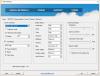
No Prob, following the settings as I set them for this test flight: Regarding deletion of the complete dogfight-folder: Well, maybe good idea to do this also before I do the next testing (did this regularly in former times when I played a lot online on the different servers), but honestly I don't think this will make any difference...
-
Baaaad News..... the problem is reproducable: I did yesterday the set-up of an own server and used last saturdays map for it: I took off in an fe2b at Pluckley, flew directly to Bridge 2 (it was the active one) and destroyed it, flew back to Canterbury to start the search for the train there.... and directly when I flew low level over Canterbury suddenly ....*klick*.... and the screen went off..... It happened even faster as when I flew online... ...Well, that could point out something else: On Saturday I reduced my graphic settings a little bid, for this test I put everything to the absolut maximum... so it could be, that the graphic settings make a difference for this issue.... On the one hand thats for me absolutely not understandable as my new GPU is far away from any limit in RoF even with the highest settings, on the other hand I have more and more the feeling, that the issue is not directly caused by the GPU but from any other component around and the switch-off of the GPU is only the symptom.... However, I have no idea to find it out, but based on the fact that I can reproduce the problem at least there is one small hope: I can play around with the graphic settings and maybe find a level, where this issue is not happening anymore, but which is still good enough for navigation and plane spotting..... ...but this approach will probably take some time; so for the time being that means I am out from FiF :unsure: Thats a pitty for me, as FiF is the best chance to meet more of you; nevertheless I hope there is the chance to fly together either on Cubans Server or on our Flying Circus server or on any IL2-Server... Edit: And thanks again Luft for all your support, esp. for the tipp to set up my own server with the FiF-map for testing purposes; this was a great idea and shouold have done this already during last tournament where this issue occured for the first time...
-
Ahhhh... now it finally worked. In the first run the tool really found something, but then I saw that I had the BA7 Modpack still installed, so I first removed this via JSGME and did the search again and then only the plane skins were found anymore. But as you wrote before I also don't think that the mods were the reason for my problem. So far I did not even start RoF since last Saturday, I hope I'll find the time to Setup my own multiplayer-mission based on last FiFs map and fly 1 or 1,5 hours somewhen before end of the week! That's the most realstic setting that's creatable… beside that there's only the next possible FiF-Session as a live-test available (so far I don't know our plans for upcomming Saturday, so don't know if I am available) And as you also already said: Best case would be, that either the BIOS-Change or the Afterburner-Uninstall already fixed the Problem, but finally known will this be only after my next FiF session ;-) Anyhow: Thanks very much for your help so far, Luft!! Will Keep you uptodate when I made some test flights...
-
Thanks for 2nd file, the behavoiur changed now that way, that after I cklick the ModSearch no error occurs anymore but also nothing else happens…. I see in the Task Manager, that this Task Shows up for 2 seconds and then dissapear again…. Regarding the GPU Driver: Yes, that you have to install a new driver for the new card is clear and I surly did this after the installation. Nevertheless it was a good idea to check this, as meanwhile a newer Version was available and updated it. Anyhow, I don't think that this is a driver-problem, but who knows!?
-
Hi, thanks for the tips… your assumptions on my capabilities are not soo wrong ;-) …. but nevertheless, e.g. I know the Rise of Flight Folder and the file "ModSearch" is located directly there, e.g. next to the JSGME-Files. Nevertheless it's not working, Maybe the reason can be that my Installation is not on the Default-Directory but under "D:\Rise of Flight"? ...well, I will try it with the .NET repair tool. Regarding the GPU: The 1060 with 6GB was already an upgrade to my system which is more than 5 years old and was originally delivered (as complete system, so BIOS Settings were done by manufacturer) with a 660 Ti. More money I did not want to invest in this old system, so the 1060 seemed to me as quite good compromise. And so far the experience justify this decision: I am playing the complete BOx-Series on pretty high settings with allmost no issues. I see my system coming to its limits in single player campaign missions, when many AI planes are active. But here clearly the CPU is the limiting factor and not the GPU, so any better (and more expensive) graphic card would be a waste in my current system, before I buy one I will rather buy a complete new PC. So overall the 1060 with 6 GB is the GPU that makes most sense for me and deliveres (beside that one issue) a pretty good performance. Anyhow I never had the Intention to overclock anything on my PC and the Afterburner Software is meanwhile already uninstalled. ;-) What is without any doubt a good idea is to use the Mission files and set up a multiplayer server for my own to test if the issue happens also without other players… will try to do this before the next session where I can participate... Thx :-)
-
Hi Luft, thanks for your comprehensive feedback! Regarding try to create this GPU crash on other Servers or in Single Player: This I did, e.g. directly after it happened the 1st time at the tarnopol map I flew several single player missions on tarnopol map with similar weather settings and plenty AIs => no problem occured. And on other Servers: Well, beside cubans vintage missions there are no RoF Servers populated enough anymore to test this (at least not at times where I am able to fly) and on cuban server there is no problem at all. Regarding the BIOS: I never changed anything in the BIOS settings until yesterday evening when I was forced to by the system. So if the root cause of the problem was connected to some BIOS settings yesterdays changes maybe fixed it.... Many thanks for the MOD search program, unfortunatly it doesn't work for me because trying to use it (after I placed it in the RoF-Folder) I get an .NET-Framework-Error telling me that File or Assembly "ROFTools.Common, Version=1.0.0.0) was not found… and after confirming this message I get this screen without any Content :-( But => coming to the most important hint you gave me via asking what I am doing with the Afterburner Utility... and the answer is: In reality don't know I installed it to see what would be theoretically possible, but finally I did not overclock anything. The only real use this tool has for me is that I can turn on the logging to see the how GPU and CPU are performing in the different gaming situations, which is sometimes really interesting… But all the other possibilities for me are complete useless. So it might be anyhow a good idea to uninstall that app; who knows: Maybe this program creates any conflict for the GPU in certain situations where without it there would be no problem…. So I will uninstall and if no other problems occur I might give it another try in one of the next FiF sessions!! Salute & Thanks once again Luft!
-
Hey Guys, following a long posting to describe a very strange issue I have with my PC system in the FiF events since I bought a new GPU last September (MSI GTX 1060 6 GB): After some time of flying the monitor suddenly goes into stand-by while the system (or at least parts of it) is still running. I can still hear the action in the game and even talk to the other players on teamspeak. But the Keyboard seems not to work, at least ALT+F4 or CTRL+ALT+DEL don’t have any effect Turning the monitor off and on again also has no effect, it stays in standby…. So in that situation the only thing I can do is a hard shut down of the system via on-off-switch. Yesterday the situation was a little bid more complicated, as the reboot didn’t work properly: The first few tries the system simply didn’t boot at all and then when it finally started I got a BIOS message telling: „Overclocking failed! Please enter Setup to re-configure your system.“ Well I had no Idea what the f*** I should change in the BIOS settings so I entered them but left it without any changes… but in the next boot the message came again so decided to set all CPU related settings to „automatic“, hoping the system knows better what to do then me…. It seems this strategy was not too bad, at least the system booted and so far it seems to work stable. For yesterdays FiF mission I activated the MSI Afterburner logging with all possible details, so I was curious if I could read anything out of this logs and one thing is pretty clear now: The Graphic Card simply stopped working! All graphs in the log that are GPU related (GPU temp, GPU Usage, GPU Fan, etc.) dropping down to Zero exactly in the same moment, while all CPU related graphs continue normaly, the CPU usage goes significantly upwards after the GPU stopped (but only to a peak of ~75%). But: I see no hint at all, why the f*** that happend !!?? GPU Temperature never climbed higher then 68 degrees, GPU usage hardly ever reaches 60%. The CPU is much older then the GPU, it is an i5-3570 3,4 GHz, so it‘s usage is higher then the one of GPU but also not critical, esp. in the last minute before the GPU stopped it reached never higher then 75%, also temperature of any of the Cores never climbs higher then ~60 degrees… So I find in the logs nothing that explains why the Graphic Card simply decides to stop working And to complete the mystery: This strange behaviour is strictly limited to the Flandern in Flames events. It started in the last tournament on the tarnopol map where I first thought the combination of heavy clouds in between the mountains caused the problem. But I had it also last week in the testrun and yesterday. 2 weeks ago I flew at cubans server 1h 24 minutes on the channel map (also with heavy clouds I remember) and without any issues. I fly the Il2 BOX series online and offline where both GPU and CPU loads are much higher, in fact the CPU usage in IL2 is pretty much on the limit, and I play Kingdom Come Deliverance and in none of these Games I have this specific issue at all (of course, sometimes there is a game freeze or a game crash, ok, that happened also in RoF sometimes, but never such an issue with the GPU). The chance that it happens in FiF I would estimate with a probability of 70% or even higher…. So, many words later I finally bring it to the point: Any one has any idea what I could do? What is hidden especially in Butzzells maps that causes my GPU to refuse working…. ??
-
Yes that could easily be the case....
-
well, I'll see it as long-term-vision: Some decades in the future, when our flat will be free of kids and there will be plenty of space available and I am retired and too old to fly IRL => Then I will start the project of setting up something like this (resp. pay someone to set it up), but based on the most recent and powerfull VR equipment available at this time then..... And to make the feeling for WW1 perfect, in my setup there will be variable pitch fan included in the front
-
...was not sure which section would fit best for this vid: It's just a little inspiration how to reach a new level of immersion: ...I would be curious how this would feel in combination with VR equipment...