


Fhechene
-
Posts
175 -
Joined
-
Last visited
Everything posted by Fhechene
-
Because I don't see any autogenerated Static Runway in Berlin, Western Europe or Balaton, even when they have an English Airfield Edit: I once added a 'Polish_Airfield' in the Berlin map, and it didn't autogenerate a static runway object. I had already one, however. And that was in .49 final, so maybe things changed in .50b5?
-
So, airfields.dcg gives you the ability to choose the first waypoints and direction of an airfield, like this [Wheeler_Airfield] TAKEOFF 252518.25 53145.05 0 0 NORMFLY 250011.80 55739.09 300.00 300.00 NORMFLY 246434.23 60304.33 600.00 300.00 NORMFLY 246741.50 66076.73 900.00 300.00 NORMFLY 250494.66 70949.25 1200.00 300.00 So, how about the ability to link the LANDING waypoint to some static object? [Dummy_airfield] LANDING 101824.38 34384.53 0 0 0_Static 0 &0 for 0_Static ships.Ship$RwyTransp 2 102303.80 33934.20 585.00 0.0 20 2 1.0
-
So the static artillery/objects don't actually need to correspond to the columns? So GermanyCarsColumnC could place japanese cars, for example?
-
No Allied column moves forward=> Oil question
Fhechene replied to Fhechene's topic in DCG Public Discussion
Chiefs stood still for 4 campain days until I added wagon8 objects -
So, since like 2-3 campaigns days the Allied columns don't move forward. Tailspin document says that this happens because Allies have no Wagon8 objects, which means they don't have in map oil, just off map oil. So, my question is, is oil still linked to only Wagon8 objects? Does having oil or cargo trucks count for oil? So, I could just add some Wagon8 Allied objects in the stationary.dcg file if I just wanted Allied columns to move forward, right? Edit: I've answered my own question Yes, only Wagon8 work for the oil system. And yes, If I add some wagon8 objects, the columns move forward.
-
Isn't buildings.dcg the file in which FMB placed objects are stored?
-
I though it may have been the map, so I tried with other map, in another career and the buildings started shining new, so the issue is not the map. I checked the houses.dcg file in both campaigns and they were both empty: they both had only [House] written in. Could you take a look into it, please?
-
I started a campaign just to see if maybe I was mistaken, so in the first mission I bombed the crap out of a city and then quit mission. I loaded the next mission and the buildings appeared as good as new.
-
Offline campaign, replacing stock dgen with dcg, with 50b3
-
It's weird, because there was a city that was bombed to smithereens in a mission, and in the next mission it was intact. The buildings that were destroyed were map buildings, not added buildings (FMB objects).
-
Hi! The other day, I destroyerd some buildings, and in the next mission I realized that they didn't remain destroyed. Does DCG record building destruction?
-
Maybe, but the side controlling the location was Germany, and those Chiefs were Allied. Tangentially related: now that you mention it, does the word Factory only has to be in the name of the location? For example, could I name a location sdfuysfkjh_Factory_fjghsddsg and would work as a Factory the same as Factory_AaAa and BbBbB_Factory?
-
I started this campaign after adding that location
-
Could you make sure you are respecting syntax? Maybe you are using B-25 instead of B_25, or something like that. Because I have added, deleted and modified plenty of squadrons.
-
These are screenshots of 194502030.mis. Notice how the arrows point to chiefs (unrelated to the question: the rightmost convoy is just a supply column and a M16 thay some missions later will face on their own some German tanks, while the leftmost columns are plenty of tank columns that haven't faced any German tank). The troublesome chiefs are the downmost arrow. Those chiefs weren't near in the previous mission Edit: now that I think of it, I added a _Factory_District there. Could that have something to do with it?

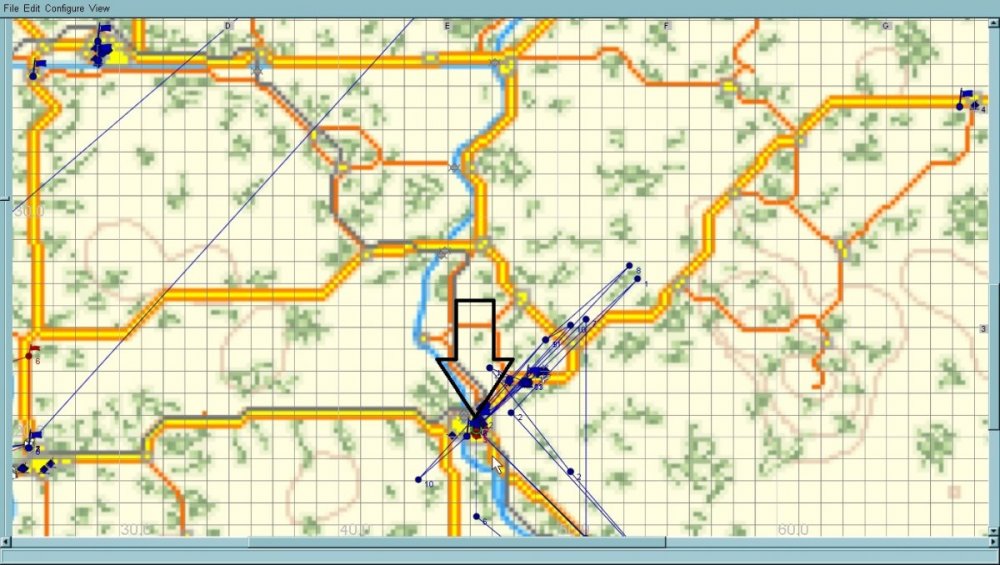
-
As usual, backup all the files you'll modify. First, in the data folder inside the DCG folder, locate the corresponding .rds file. Leave it open. Try to find the location nearest to the airfield. Say it's Olegovo. Open a new mission in FMB (in NetMountains, of course)and add a land chief (vehicle or tank or whatever whatever) .First point should be on Olegovo and last waypoint must be close to (BUT NOT OVER*) the runway at Valley_Airfield. Save. Now, go to where the corresponding .mis file, open it with notepad and go to the chief waypoint you just added. Copy them Back in the .rds file that you opened, write [ Olegovo to Valley_Airfield] and below that, paste the waypoints you just copied and save. There you go. *If you place it over the runway, planes will spawn perfectly, but tank, vehicles and other caravans will start/end exactly over that waypoint, which could make them crash with airplanes There is a great DCG guide by Tailspin that, while a little outdated, will teach you the basics Edit: don't be afraid to break things up. If you look at my profile, you can see that plenty of my post are asking for help because I broke stuff. Advices: -respect tabulation as if it was your mom's will. -if an Allied squadron starts in Axis territory it's because you need to add it to squadsid -DCG doesn't like chief companies too much, so try to refrain from using them -sometimes, even if you have an error and delete every file from DCG and campaigns created with it, and reinstall DCG from the file you downloaded it, the error will persist, so it's better to find the error instead of deleting everything (sometimes, you will have to delete the campaign you were playing, though) -when you have an error, read the error description, so you have a clue -and a life advice (not only DCG), a great way to learn is answering people's questions
-
I was using 50b3. And regarding trucks and convoys, in the previous mission they were far, far away from the place the appeared in that mission. Wanna see a screenshot?
-
Hi! Sometimes, flights that airstart crash because they start too close. Could you make them start just a little farther? It's weird because most of the time they start far enough to not crash into each other, but only sometimes, they start and crash. Other thing: Today a convoy and a tank column started way inside enemy territory, far away from the front. They will get obliverated by airplanes, of course. Now, how difficult would it be to check that this doesn't happen? Thanks! You rock!-
-
How about instead of using the TCapture to change location sides before the start of a campaign we had something like the "localeN=" for both attacker and defender?
-
No, I havent', and I doubt I can try in the near future, because once again I broke my DCG installation. However, could you try doing something like that in any other campaign and tell us the results?
-
Yes. But as usual, you have to backup. And remember, this is the Dgen folder of your Il-2 folder, not the dgen folder of your DCG folder. And with dcg, you'll also have to check the date restrictions of the plane you'll add, so it doesn't get upgraded or something.
-
Hi! As you know, I'm always making my DCG installations unplayable. This time has been no different. I have no idea what I did, but I can't start campaigns anymore, with the ' " is not a valid number ' or integer or whatever error. Now, would it be possible for the program to say instead ' " is not a valid number Last file read is bleh, at bluh line' or something like that? At least name the file, so I can know if it's the master.mis file or one of the .dcg files or .rds or whatever what I screwed up. Edit: This is diferent from the dcgerror file. In my case, my dcgerror looks like this [2019/05/26 00:57:03.589] Parameter String0 = D:\steam\steamapps\common\IL 2 Sturmovik 1946\IL2 DGC 349\il2dcg.exe [2019/05/26 00:57:03.593] DCG.ini processed. [2019/05/26 00:57:03.601] Loaded messages processed. [2019/05/26 00:57:03.605] DCG is active. [2019/05/26 00:57:03.611] Game version checked [1946]. [2019/05/26 00:57:03.615] Game version includes IL2AEP [True]. [2019/05/26 00:57:03.618] Game version successfully set up. [2019/05/26 00:57:03.629] Mission Button Enabled. [2019/05/26 00:57:03.634] Player Name Checked. [2019/05/26 00:57:03.738] Universal Paints Initialized. [2019/05/26 00:57:03.744] Description Determined. [2019/05/26 00:57:03.748] No Campaign selected. [2019/05/26 00:57:03.844] Form Create Complete [2019/05/26 00:57:22.459] No campaign active. [2019/05/26 00:57:25.75] No campaign active. so no record of the error I had.
-
Every line must have the same tabulation. It also should be tabulated only with spaces, not with the tab key. Now, what it seems you are trying to do is change the planes available for player selection at the start of a campaign, right? If this is so, you should go to the Dgen folder of your Il-2 installation and look for the corresponding planes.dat file of the campaign you are looking for. For example, if you are looking for the German Fighter (South) campaign, you open all the CampaignDE .dat files (DE for Germany, RU for Soviet Union, UM for UMarines, GB for Great Britain and so on) and find the one that has your description. In this case * Fighter (South). Dynamic campaign for German fighter pilot (army group "South"). That file is campaigndef.dat Now, look for planesdef.dat and change the planes there and you are done.
-
Ah, but TCapture absolutely works! These are the lines I have for a Kyushu 45 campaign I've made [Kyushu45_sea] 19430622 TCapture Axis Kita-Kyushu_Harbor 19430622 TCapture Axis Fukuoka_Harbor 19430622 TCapture Axis Sasebo_Harbor 19430622 TCapture Axis Sasebo 19430622 TCapture Axis Sasebo_Factory_District They are all from 1943, but the campaign start date is 23 June 1945. The front is set at Kyushu, in the allcampaigns file. The first generated mission has Sasebo and other places as either Allied or contested. After the second mission is generated, all those places become Axis. If I don't TCapture those places with timetable, they remain Allied or contested the whole campaign (as there isn't an invasion force). Edit: that's why I thought that AddSquad and MoveSquad would work, too, but it seems they behave a little different. PD: I don't know what's happening with the forum interface, but I really like it.
-
My brain has been steadily getting slower since a few months ago, so please excuseme, but, which one of these are valid before the start of a campaign? TCapture is one of those, I believe. But AddSquad isn't.

