





Lowengrin
Members
-
Joined
-
Last visited
Everything posted by Lowengrin
-
Just change it in the squadid.dcg file when you want the name to change. Sorry, that's the best I can suggest.
-
Any luck?
-
Yes, if you open DCG while playing, it may sync the log prematurely.
-
There must be some setting somewhere directing your game to save in your user/appdata directory rather than in the main folder. Unfortunately, I don't know where it would be. Possibly it's in the Window's Registry...???
-
Seems I'm not the only one who can't let IL-2 go.
-
You can do it in the squadid.dcg file. The first column is the game's ID and the second is whatever you want to call it.
-
One thing I noticed immediately is empty lines between your location entries. Remove them. There should be no empty lines in the file at all. Not even at the end.
-
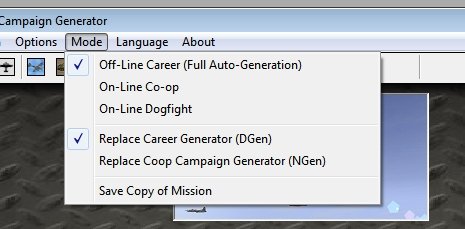
You should set auto-generation on BEFORE generating the first mission and then go generate the first mission as if you were playing a regular campaign from the game. Don't generate the campaign in DCG. See image:
-
Sounds like you have it set up for manual generation (for the original IL-2 game). Under Mode is Off-Line Career (Auto-Generation) checked?
-
The path showing on the bottom bar of DCG seems a bit strange. Did you install DCG directly to your main IL2 folder? If so, don't. Keep it in it's own folder and make sure that when you install it, the subfolders are created (Data and Masters).
-
I think under a shortcut's properties, you can set it to run as administrator.
-
Yes, that's correct. I answered too quickly.
-
The enemy troop count will drop mission after mission depending on the number of columns opposite it. Of course, if they're getting a resupply column (as in the case above), that will reinforce them so it might take awhile. The best thing to do in this case is drop the maximum number of troop factors all locations can have.
-
Check the troop counts in the territory.dcg file. Even if there are no static objects, the troop value of a location can hold up an advance.
-
Locations don't have a set radius. Rather, each static object is assigned to the nearest location. The quickest way to check the assignment is to cycle through the Stationary Object Activation applet on the Ground Objects Editor. It'll show you the location each object is linked to.
-
The only locations that DCG recognizes as being part of a shared location are those that are _Harbors, _Ports and _Stations. So Moscow and Moscow_Station are related. But Moscow and Moscow_North are not.
-
You should be able to use "_Ferry" as a base. It's in the rds file. Yes, you can use Moscow_1, Moscow_2, etc. If it were me, I'd name them by the suburb of Moscow though. That's what I did, for example, for Odessa. If you put enough static train objects in one location (and not make them neutral!), DCG will bomb it. The more densely populated an area is with static objects, the more likely it will be targeted (especially be medium and heavy bombers).
-
Probably you need to set your game's (that's IL2's) eventlogkeep=0 in the conf.ini file. I'm guessing it's currently set to "1".
-
I really should check the code, but it could very well be code and nation.
-
That's interesting. It's been so long, but maybe I did use the plane's name as the primary key rather than the ID....
-
No, that's not how that command works. When beachhead reset is off, a defending unit at a beach will stop and defend the beach forever. When beachhead reset is on, a defending unit at a beach will reset (return to a spawning point) if there are no enemy on the beach.
-
It's not quite that simple but if you're happy with the design of the road network, then it is a big time saver.
-
Huh? (In my defence, that code was written like 20 years ago.)
-
Just the old PDF that you can find here: https://forum.jg1.org/topic/7662-lonestars-create-an-external-dcg-campaign-pdf/
-
Good question. I'd have to dig through the code to be sure, but I think that they don't. Only rail stations need a matching location so that a train knows it can unload equipment there. Same applies for ships and harbours/ports.


